Work & case studies

Operational systems built around the work.

OpsForm is a UK custom software business based in Brighton. The systems on this page are anonymous, illustrative case studies based on common operational builds. They are not attributed to named clients and do not claim measured results.

Before working with OpsForm, we managed our business through spreadsheets. We now have a comprehensive portal that brings our operations together in one place, built around the way we work.

The system has made running the business significantly easier and more efficient. We spend less time updating separate files, searching for information and duplicating admin, while having a clearer view of what needs doing. This allows us to focus more on our customers and the business itself.

Girgis has been incredibly helpful throughout the process, guiding us through each stage, answering our questions and helping us feel confident using the new system. We’ve really valued his support and would highly recommend OpsForm to businesses looking to improve how they manage their operations.

Brighton Flyway TransportSouth East transport operator

Published with the client’s approval. The examples further down this page are illustrative demonstrations with sample data. They are not this client’s system.

Featured examples

Two illustrative systems, explored in detail.

Debranded demonstrations with sample data. They are not completed client projects. Open each for the full walkthrough.

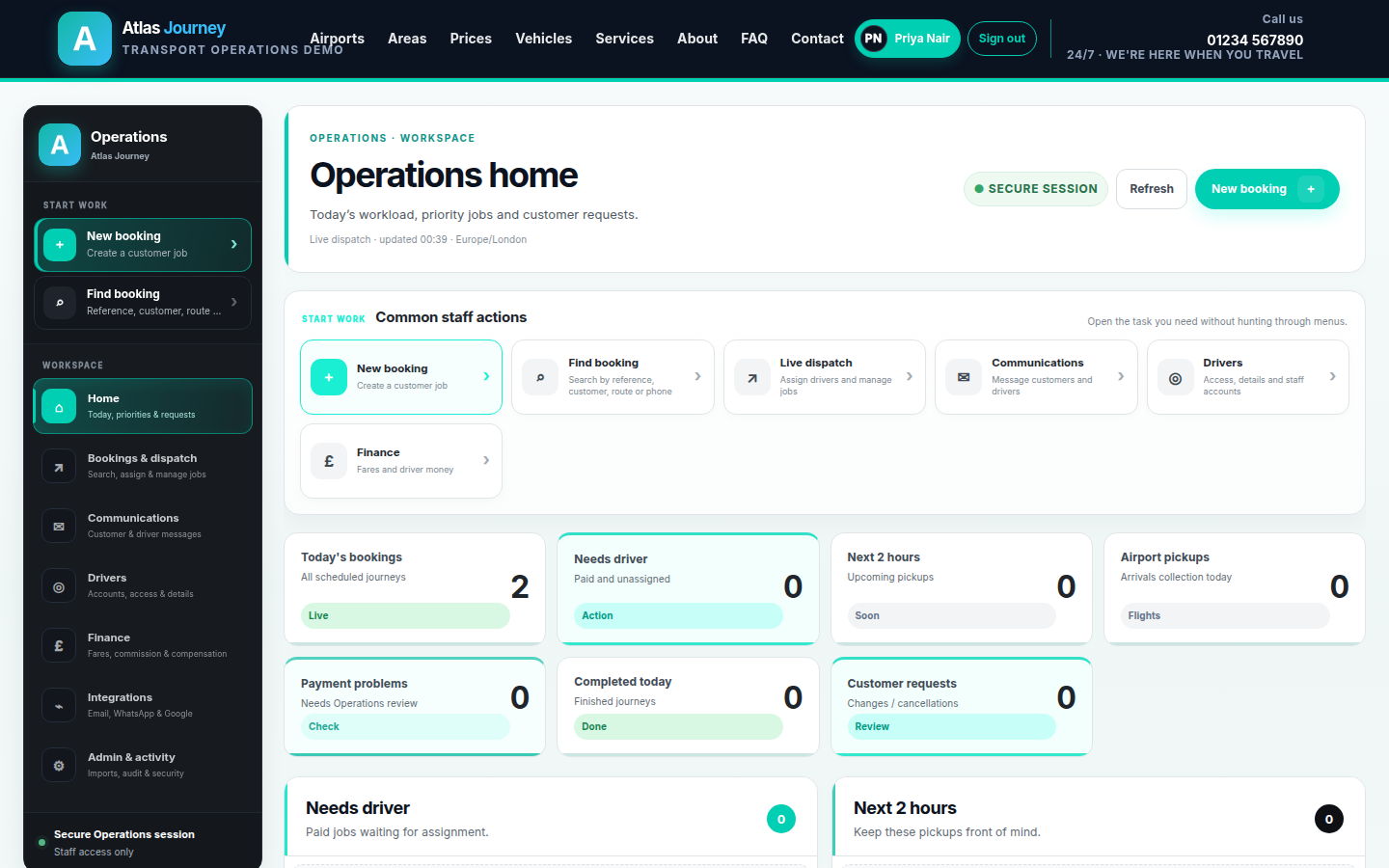
Operations dashboard from OpsForm's demo transport platform showing live workload KPIs for bookings, jobs needing a driver and customer requests.
Custom Web ApplicationOperations Automation

Transport Booking & Operations Platform

Customer bookings, live pricing, dispatch, driver tools and automated communications in one platform.

BookingPricingDispatchCustomer PortalDriver ToolsAutomation
View case study
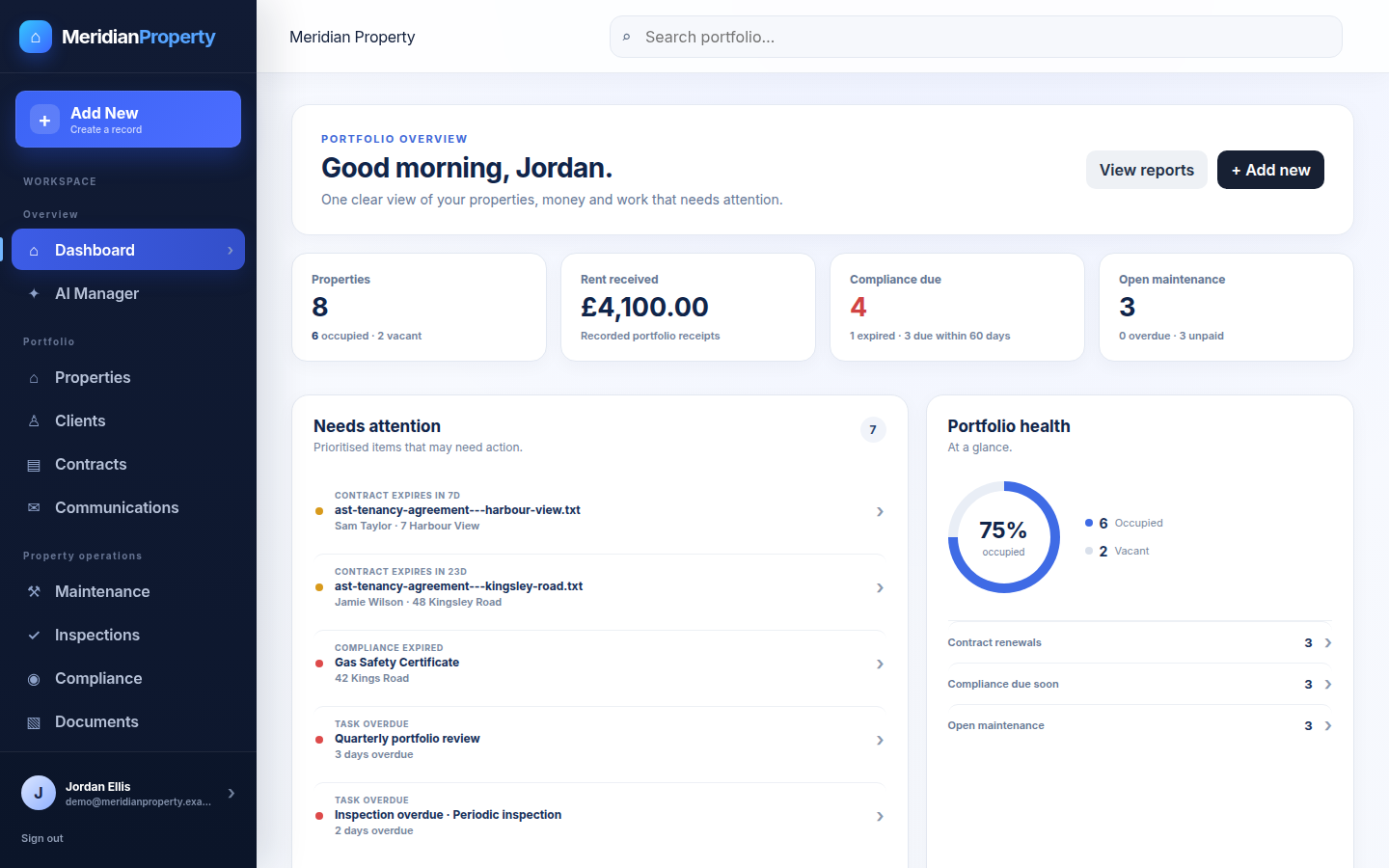
Portfolio dashboard from OpsForm's demo property platform showing KPIs, a prioritised needs-attention feed and an occupancy donut.
Custom Business SoftwareProperty Operations

Property Management Operations Platform

Properties, clients, contracts, maintenance, compliance and finance in one structured system.

PropertiesClientsContractsMaintenanceComplianceAutomation
View case study
Illustrative scenarios

More of what a tailored build can look like.

Representative examples—not attributed client work—showing the problem, a sensible first release and the operational benefit.

Transport & booking Illustrative case study

Booking, pricing & dispatch in one system

A booking-led operation was running quotes, payments and job updates across spreadsheets, messaging apps and a separate payment tool. OpsForm’s typical first release connects the customer journey to the operations queue.

Problem

Staff reconstructed each job from chat threads and shared files. Pricing rules lived in people’s heads, so quotes were slow and inconsistent.

Solution

A customer booking flow that writes straight into a staff dispatch portal—with pricing rules, payment status and communications attached to the same job record.

Important features

  • Quote → booking → payment confirmation
  • Central pricing and capacity rules
  • Operations queue with assignment and status
  • Customer update templates (email/WhatsApp where connected)
  • Audit history for changes and handoffs

Operational benefit: one source of truth for the job. Staff stop rebuilding context; customers get consistent updates from the same record.

BookingPricing rulesPaymentsDispatchMessaging
Property operations Illustrative case study

Landlord portfolio & maintenance records

Portfolio details, compliance dates and maintenance requests were spread across files, email and personal notes. The first release usually starts with reliable property records and owned open work.

Problem

Nobody had a complete view of which properties needed attention, which dates were due, or who owned each maintenance request.

Solution

One record per property, with related people, key dates, documents and tasks attached—searchable by staff with the right permissions.

Important features

  • Property and contact records
  • Tenancy/contract dates and reminders
  • Maintenance requests with owners and status
  • Compliance tracking for overdue work
  • Room to add client access later

Operational benefit: compliance and maintenance stop depending on memory. The portfolio becomes searchable and actionable.

PropertiesComplianceMaintenanceTasksRecords
Internal operations Illustrative case study

Replacing a shared spreadsheet that ran the business

A growing team depended on one shared workbook for jobs, customers and status. It worked until more people needed access, validation and a clear history of changes.

Problem

Broken formulas, conflicting edits and no real permissions. New starters could not tell what was current, and mistakes were hard to unwind.

Solution

Move the core workflow into a structured web application: login, roles, validated fields, statuses and searchable records—without trying to rebuild every future idea in version one.

Important features

  • Secure login and role-based access
  • Structured customer/job records
  • Status workflow with ownership
  • Search, filters and basic reporting
  • Change history for important actions

Operational benefit: the team shares one dependable system instead of a fragile file. Day-to-day work becomes clearer and safer to grow.

Spreadsheet replacementPermissionsWorkflowSearchAudit

Spreadsheet replacement when a shared workbook runs the operation →

Client experience Illustrative case study

Customer portal for progress, documents and requests

Clients kept asking for updates by email and phone. Staff answered the same questions repeatedly while the real work lived in internal files.

Problem

Status-chasing messages interrupted delivery. Documents and requests were hard for clients to find, and staff had no single place to publish progress.

Solution

A secure client portal connected to the internal operational record—so customers can view progress, documents and requests without seeing staff-only detail.

Important features

  • Secure client login
  • Progress and request views
  • Document sharing with controlled access
  • New request / message intake
  • Staff still keep the authoritative back-office record

Operational benefit: fewer status-chasing messages. Clients help themselves; staff keep control of the operational truth.

Client portalDocumentsRequestsSelf-servicePermissions
Other strong fits

Similar operational patterns.

If your workflow looks like one of these, the same delivery approach usually applies—even if the industry label is different.

Field service

Customers, quotes, jobs, schedules, staff, photos, evidence, invoicing and completion workflows.

Client service businesses

Leads, clients, projects, documents, approvals, tasks, support and recurring retainers.

Compliance-led workflows

Due dates, evidence, approvals, renewal alerts, responsibilities and auditable status history.

Internal approvals

Requests, decision rules, supporting documents, ownership, escalation and sign-off history.

CRM-style systems

Customers, history, pipeline, follow-ups and the operational work connected to each account.

Integrations-heavy ops

Payments, messaging, calendars and APIs connected so staff stop copying data between tools.

Workflow automation for UK operations →

Have a workflow that looks similar?

It does not need to fit a standard industry template. The process is what matters.

Talk through the process →