Custom Web Application / Operations Automation

Transport Booking & Operations Platform

An illustrative demonstration, with sample data, of a transport operations platform: customer bookings, pricing, journey management, dispatch, driver workflows and automated communications in one system. This is not a completed client project.
BookingPricingDispatchCustomer PortalDriver ToolsAutomation
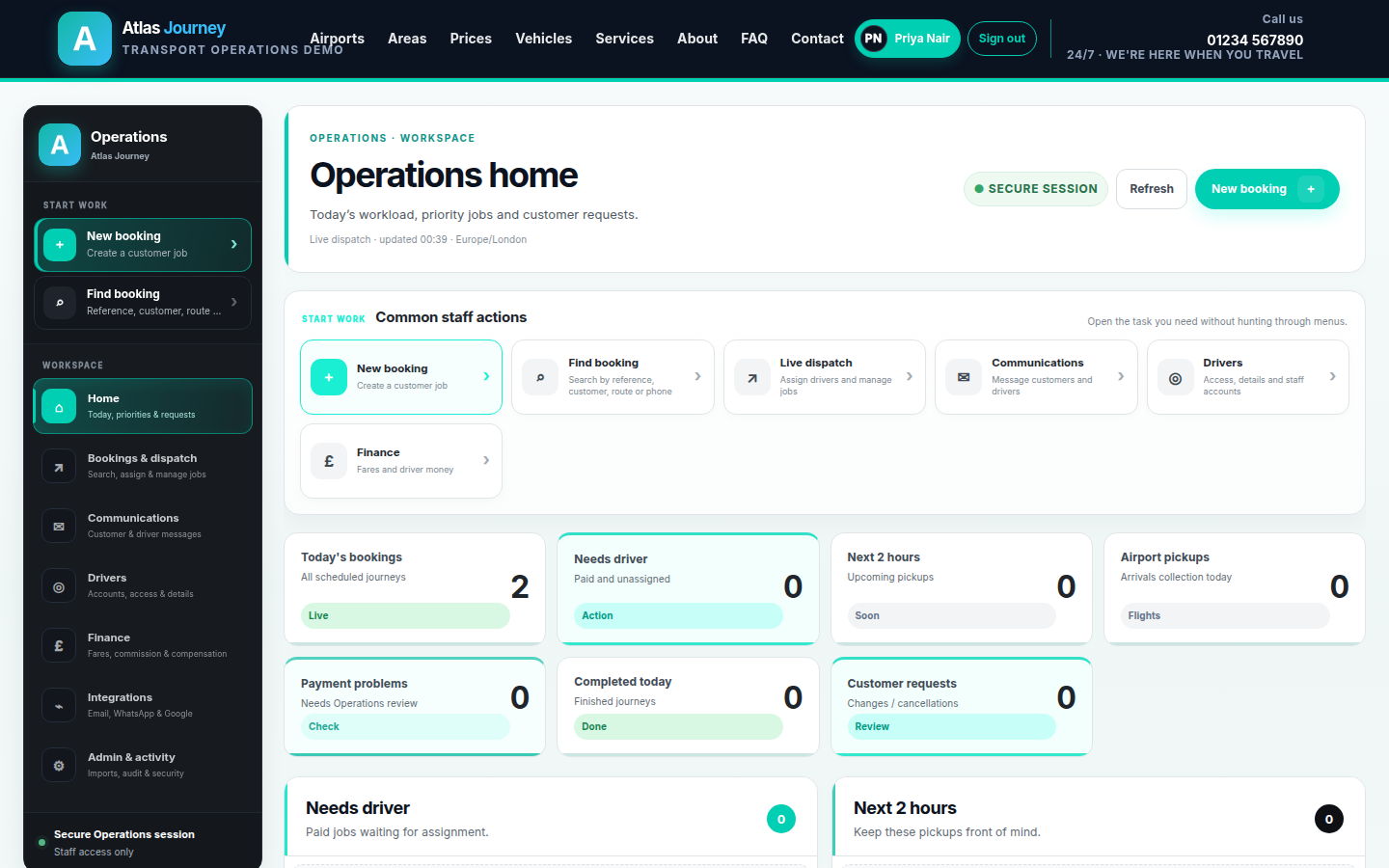
Operations home dashboard for the demo transport platform showing live workload KPIs such as today's bookings, jobs needing a driver, upcoming pickups and customer requests.
Operations home. Live workload KPIs—today's bookings, jobs needing a driver, upcoming airport pickups and customer requests—so staff open straight into the next task. Sample data shown.
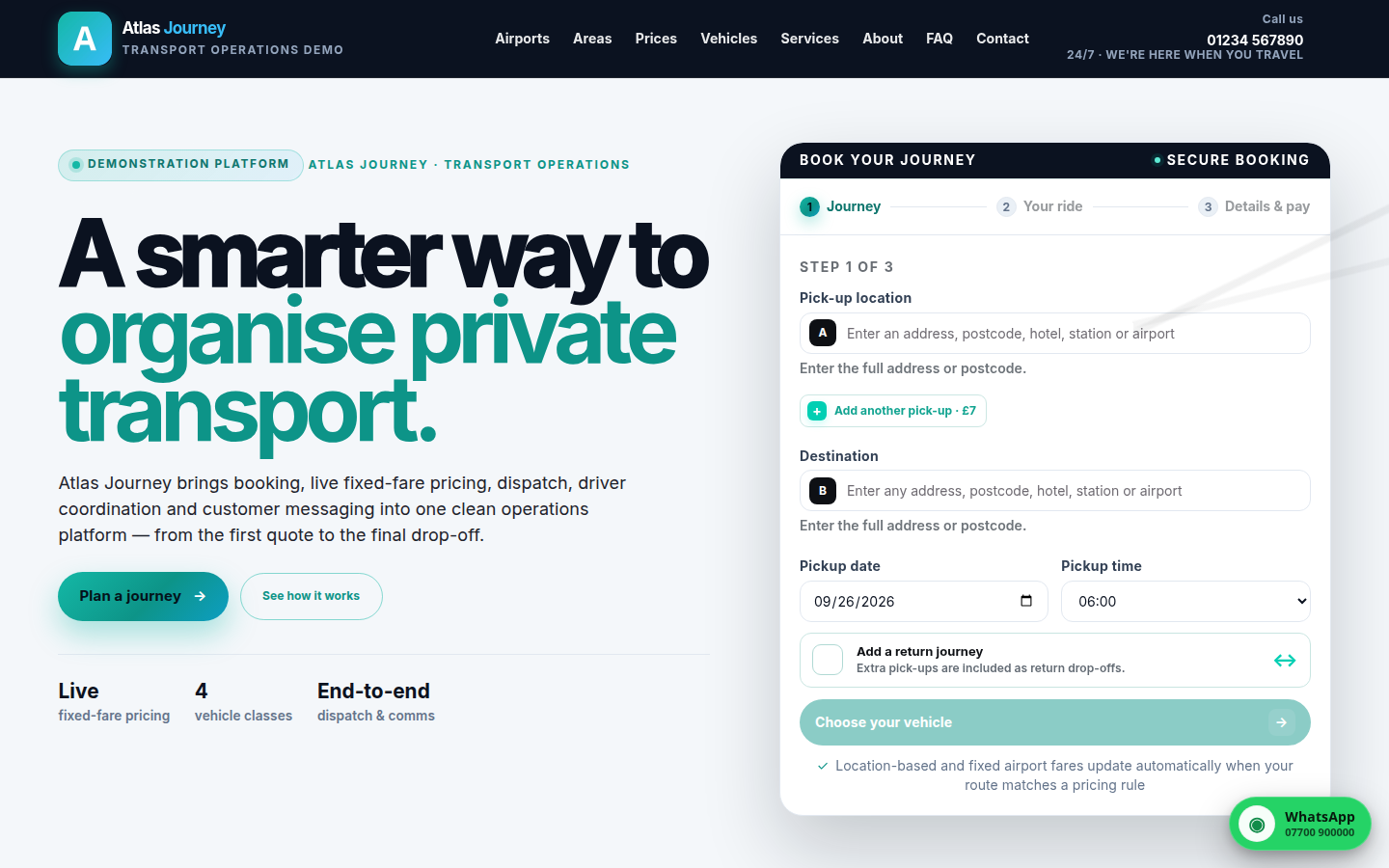
Public transport booking homepage for the demo operator with a three-step book-your-journey form covering pick-up, destination, date and time.
Customer booking. The public three-step booking journey with live pricing.
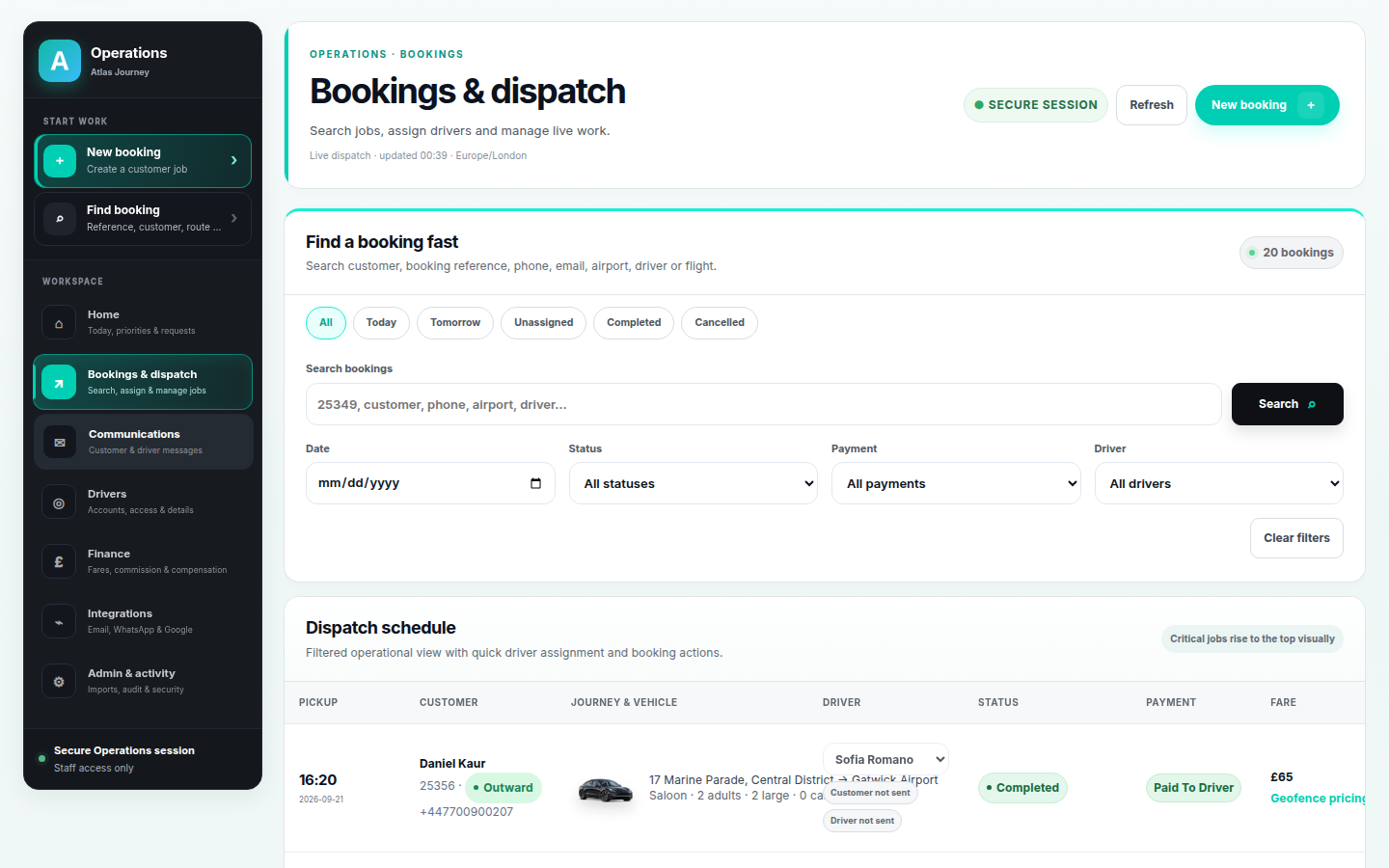
Dispatch schedule for the demo transport platform with per-leg driver assignment and status, payment and fare badges.
Dispatch. Assign drivers and read every job at a glance.
Demo overview

One platform from booking to driver payout.

The public booking site, operations dashboard, driver portal and customer communications all run from a single source of truth—so staff stop rebuilding each job from inboxes and spreadsheets.

The operational challenge

Bookings, pricing and job updates living everywhere at once.

Quotes and fares depended on someone remembering the right price for each route and vehicle.
Jobs, driver allocation and status updates were spread across messages, notes and separate tools.
Customer confirmations and reminders were manual, inconsistent and easy to miss.
Driver commission and money owed had to be reconciled by hand after the fact.
The solution

Everything the operation needs, in one workspace.

A customer-facing booking journey feeds directly into an operations workspace where staff run dispatch, manage drivers, control fares and message customers—all backed by a complete audit trail.

  • Customer booking
  • Dynamic pricing
  • Passenger & luggage requirements
  • Journey management
  • Vehicle selection
  • Dispatch
  • Driver workflows
  • Customer portal
  • Automated communication
  • Operations management
Key features

Built around how the operation actually runs.

Each area is a verified part of the platform, connected to the same records so nothing has to be re-keyed.

Customer booking

A three-step public booking journey that shows a live quote before the customer confirms.

Dynamic pricing

Live geofence and fixed-fare pricing applied automatically from the operator's own rules.

Vehicle matching

Vehicle classes selected by passengers and luggage, priced the same way dispatch runs them.

Return journeys

Return legs, extra pickups and optional extras handled inside a single booking.

Dispatch

Search, filter and assign a driver per leg with status, payment and fare on every row.

Driver portal

Drivers see their assigned journeys, update live status and have commission tracked per job.

Customer portal

Customers manage their own bookings instead of calling or emailing the office.

Automated communications

Pre-approved email and WhatsApp templates keep customer and driver contact consistent.

Inside the platform

A closer look at each workflow.

Screenshots from the debranded demo. All names, fares and figures are sample data.
Public transport booking homepage for the demo operator with a three-step 'book your journey' form covering pick-up location, destination, date and time.
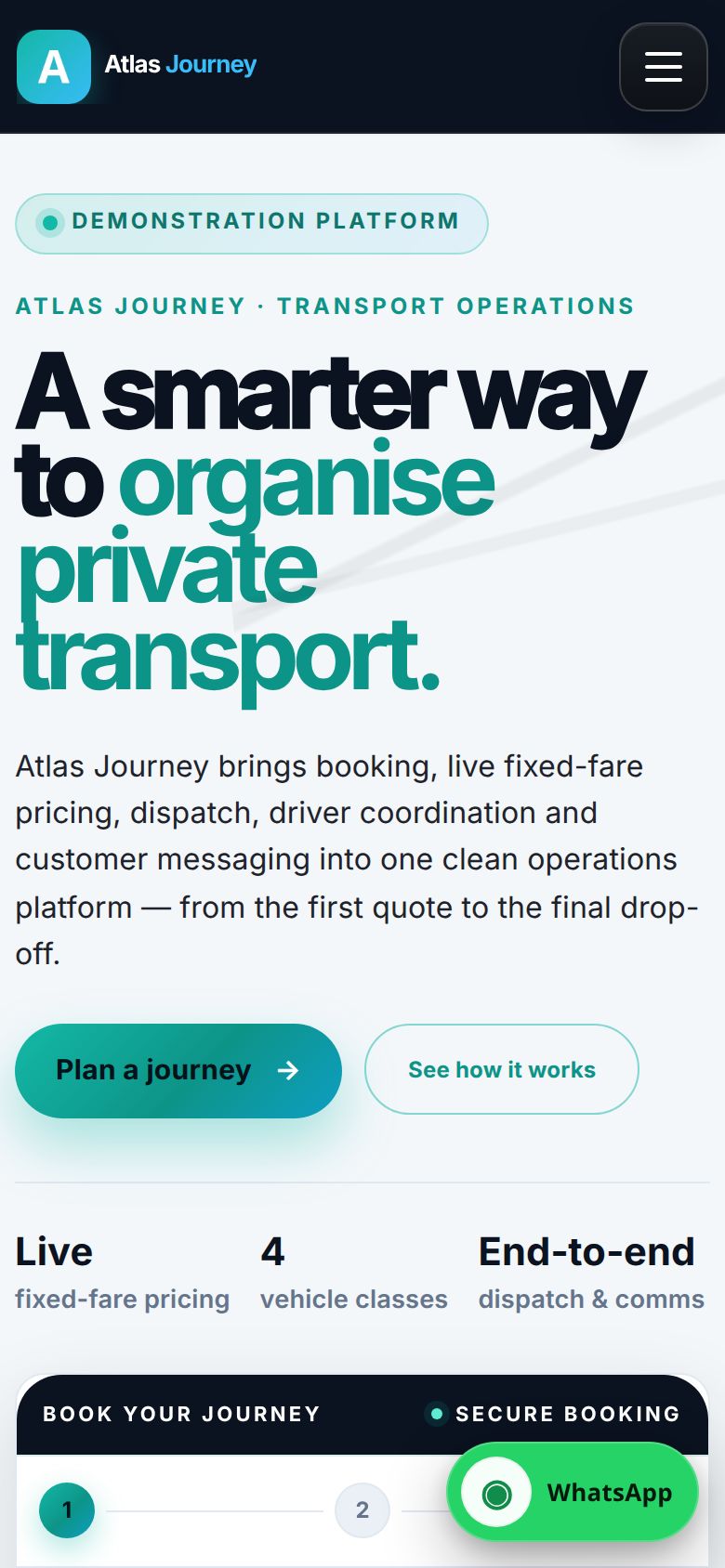
Mobile view of the demo transport booking homepage with the step-one journey form.
Customer booking journey. A three-step flow with live pricing, vehicle auto-selection, return journeys, extra pickups and optional extras such as meet & greet, child seats and pets—responsive down to mobile.
Booking & pricing

A booking flow customers can finish, with fares that follow the rules.

The booking engine calculates the route, selected vehicle and eligible extras, then shows the live quote before confirmation—so pricing stays consistent with the operator's own fare rules instead of a manual quote.
  • Live geofence and fixed-fare pricing
  • Automatic vehicle selection by passengers and luggage
  • Return journeys, extra pickups and optional extras
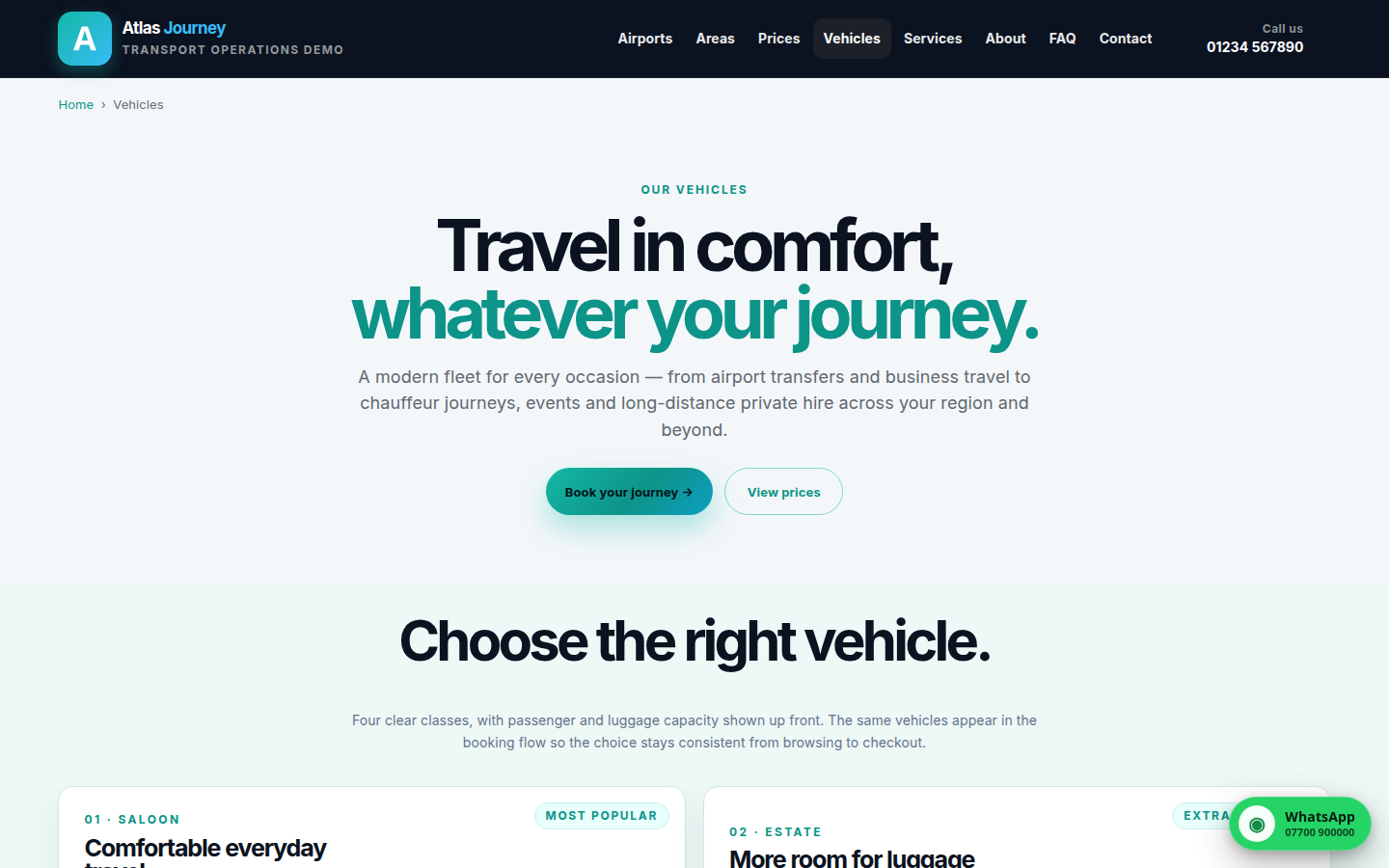
Vehicle classes page for the demo transport operator showing fleet options with passenger and luggage capacity.
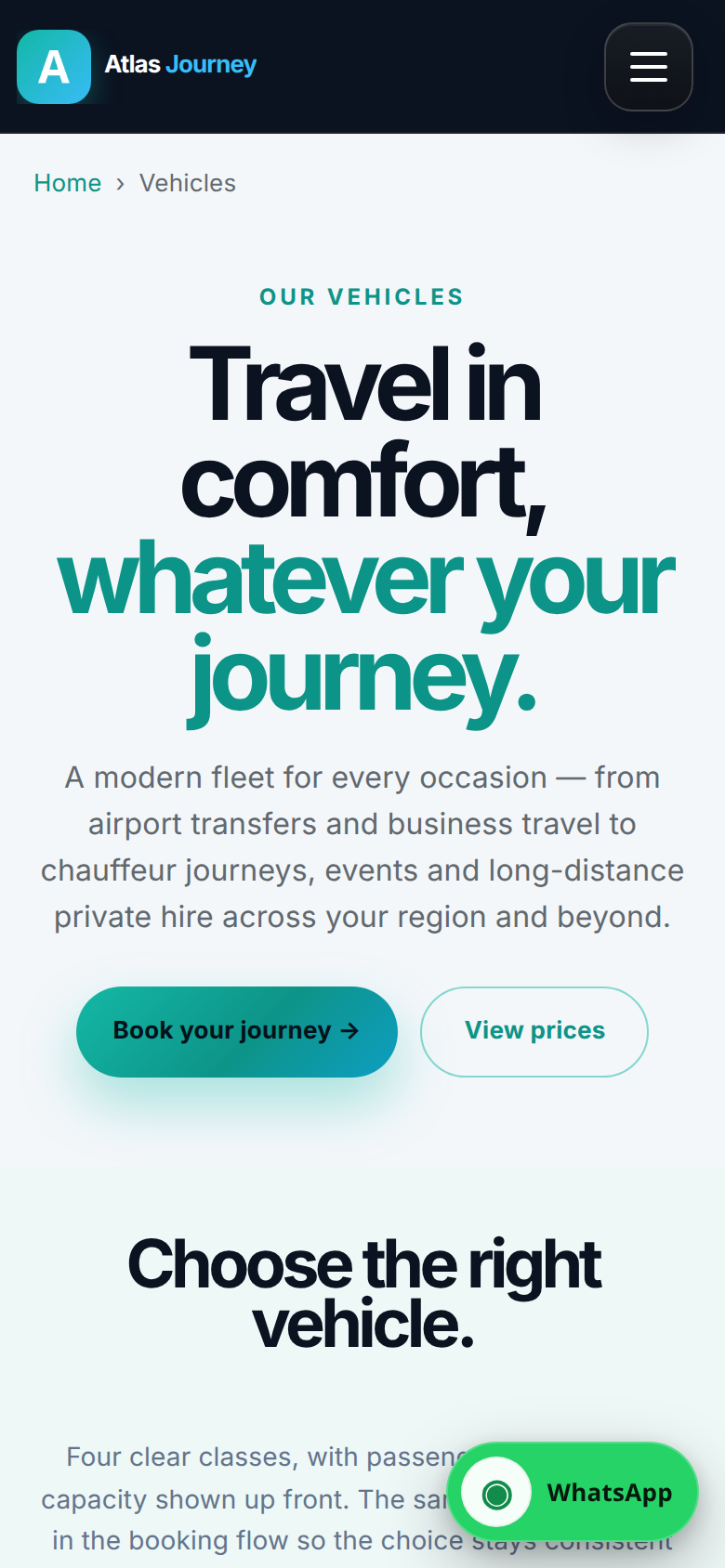
Mobile view of the demo transport vehicle classes page.
Vehicles & transparent fares. Clear vehicle classes with capacity shown up front, and set fares presented before booking so the quote a customer sees matches what dispatch runs. Sample fleet shown.
Vehicles & fares

The vehicle a customer picks is the vehicle the system prices.

Vehicle classes carry their own passenger and luggage rules, so the same choice drives both the customer quote and the operational job—keeping browsing, checkout and dispatch consistent.

  • Passenger and luggage capacity shown up front
  • Fixed fares with the airport drop-off charge included
  • Editable fare rules applied automatically in the booking flow
Dispatch schedule for the demo transport platform listing pickups, customers, journey and vehicle, per-leg driver assignment, status badges, payment status and fare.
Dispatch schedule. A filtered operational view with quick per-leg driver assignment and clear status, payment and fare badges so the jobs that need attention rise to the top. Sample bookings shown.
Bookings & dispatch

Assign drivers and read the state of every job at a glance.

Staff search or filter bookings, assign a driver to each leg and see status, payment and fare together—so unassigned or at-risk jobs are obvious rather than buried.
  • Search and filter by reference, customer, route or driver
  • Per-leg driver assignment with status controls
  • Status, payment and fare badges on every row
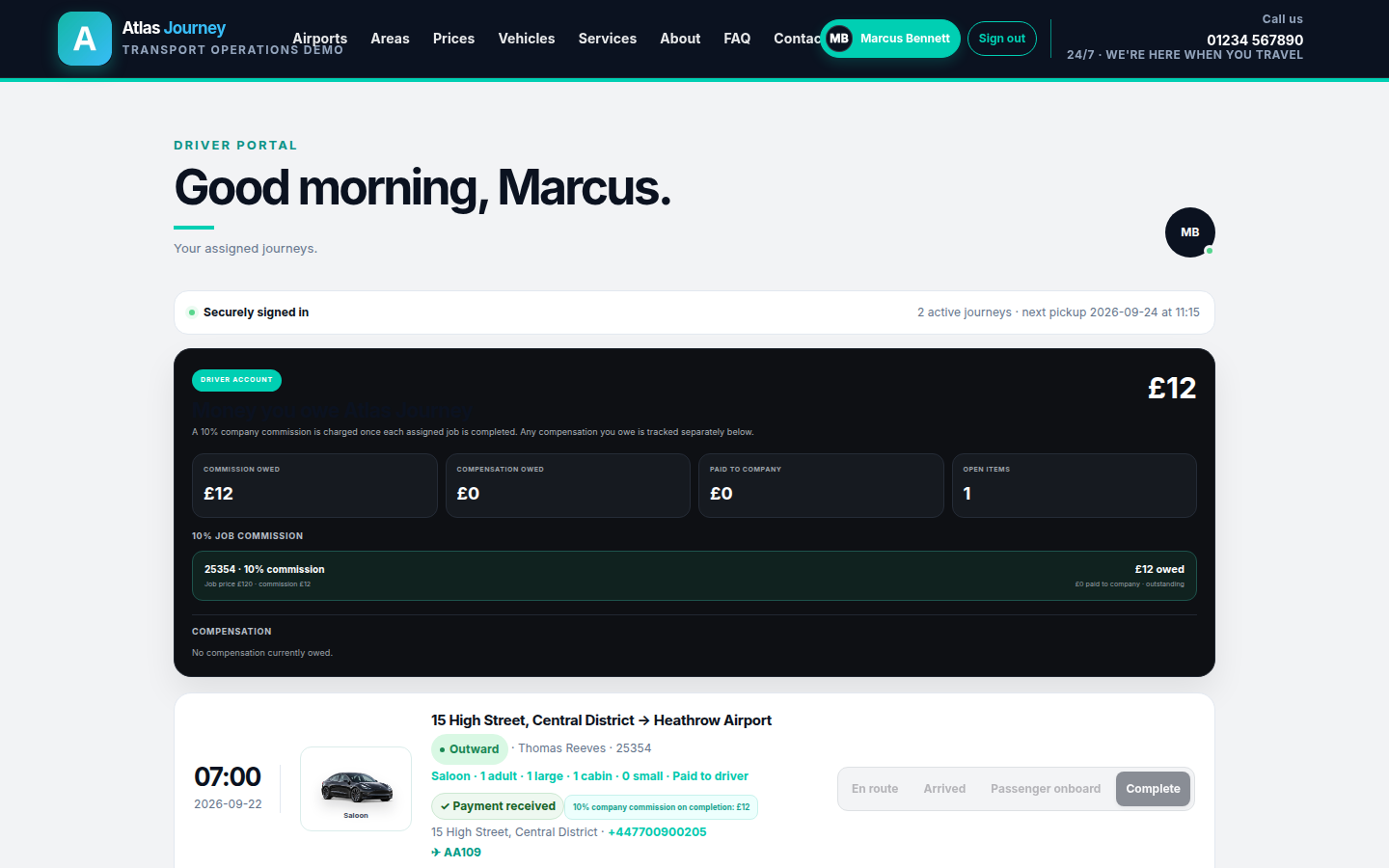
Driver portal for the demo transport platform showing assigned journeys, live status controls and automatic 10% commission tracking with money owed to the company.
Driver portal. Drivers sign in to see assigned journeys, update live status and track the automatic 10% company commission owed on each completed job. Sample driver and figures shown.
Driver tools

Drivers get their jobs; the business gets its numbers.

A dedicated portal shows each driver their assigned journeys and lets them move a job through its statuses, while commission on completed work is calculated automatically—no separate reconciliation step.
  • Assigned journeys with live status updates
  • Automatic 10% commission tracked per job
  • A clear running balance of money owed
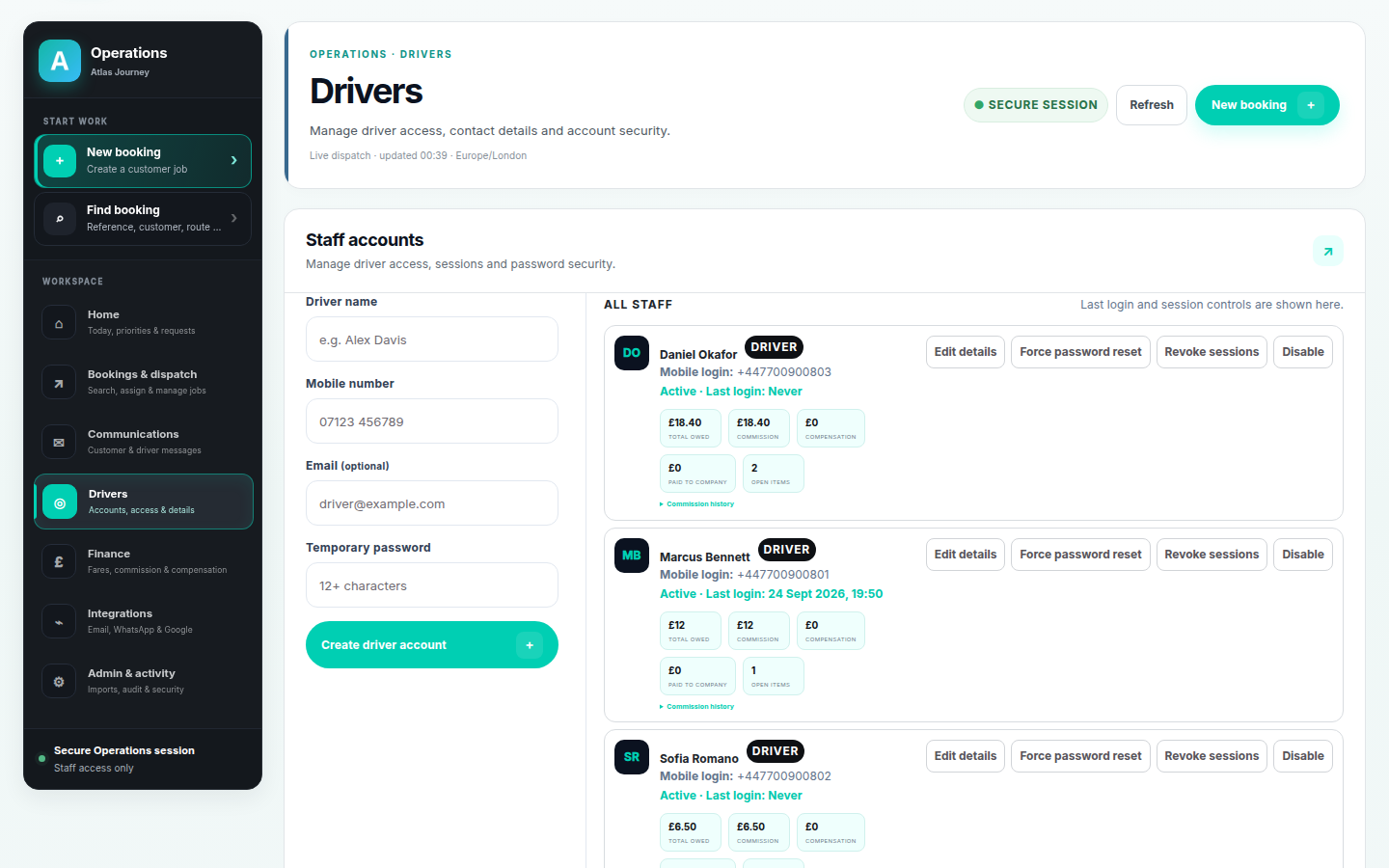
Driver management screen for the demo transport platform with mobile-login staff accounts, access controls, last-login information and commission balances.
Driver management. Create mobile-login driver accounts, control access with force-reset and revoke-session tools, and see commission balances per driver. Sample accounts shown.
Access & accounts

Driver accounts and access controls, kept in one place.

Operations staff manage driver accounts, sessions and password security directly, with commission and compensation balances visible against each person.
  • Mobile-login accounts with access controls
  • Force password reset and revoke sessions
  • Commission and compensation balances per driver
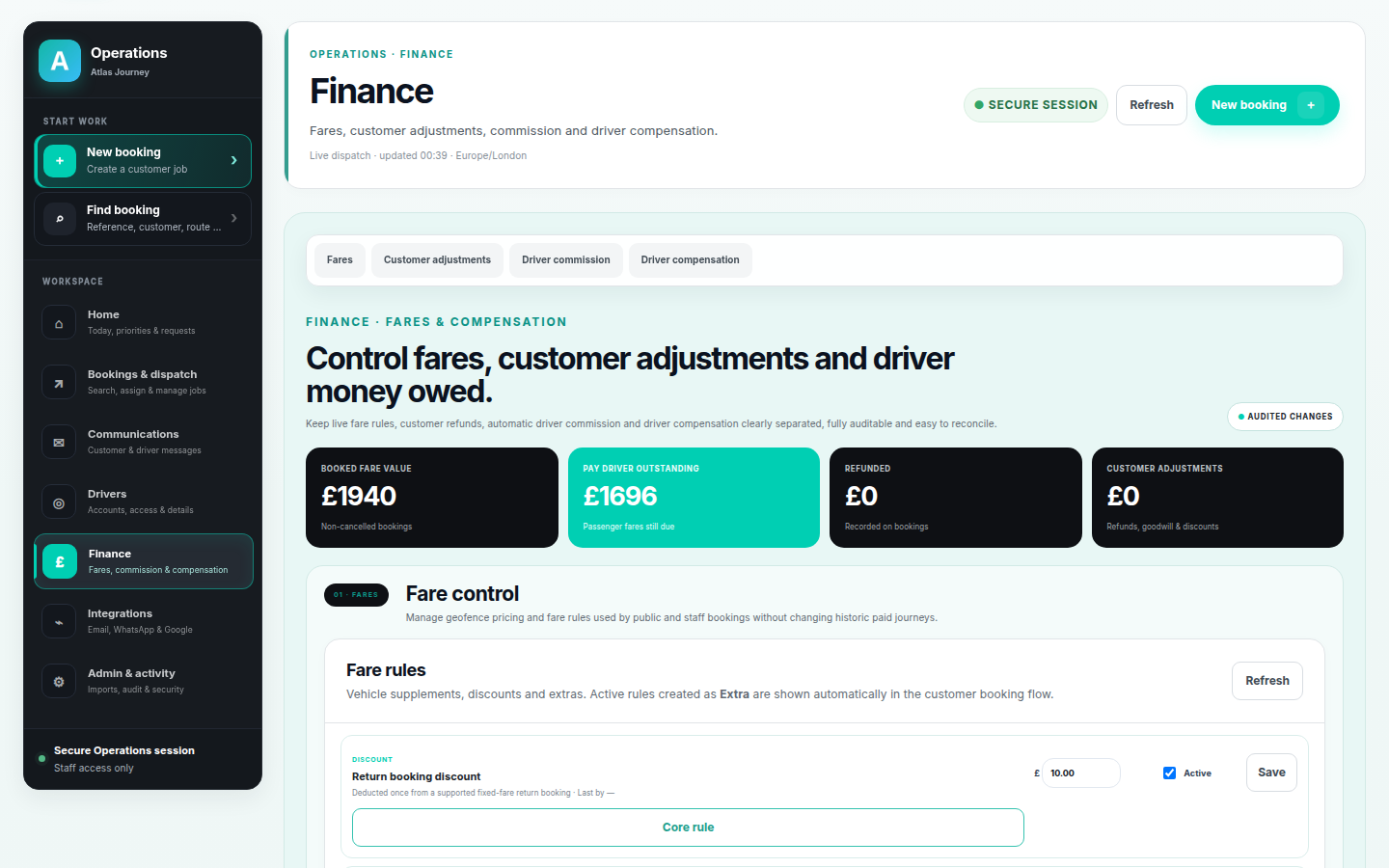
Finance screen for the demo transport platform showing booked-fare value, driver money owed, editable fare rules and customer adjustments as separate, auditable areas.
Finance. Booked-fare value, driver money owed, editable fare rules and customer adjustments are kept separate and fully auditable, without rewriting historic paid journeys. Sample totals shown.
Finance

Fares, commission and adjustments that reconcile themselves.

Fare rules, customer refunds, automatic driver commission and compensation are separated and audited, so the money side stays easy to explain and easy to reconcile.
  • Booked-fare value and driver money owed at a glance
  • Editable fare rules and customer adjustments
  • Audited changes that leave historic journeys intact
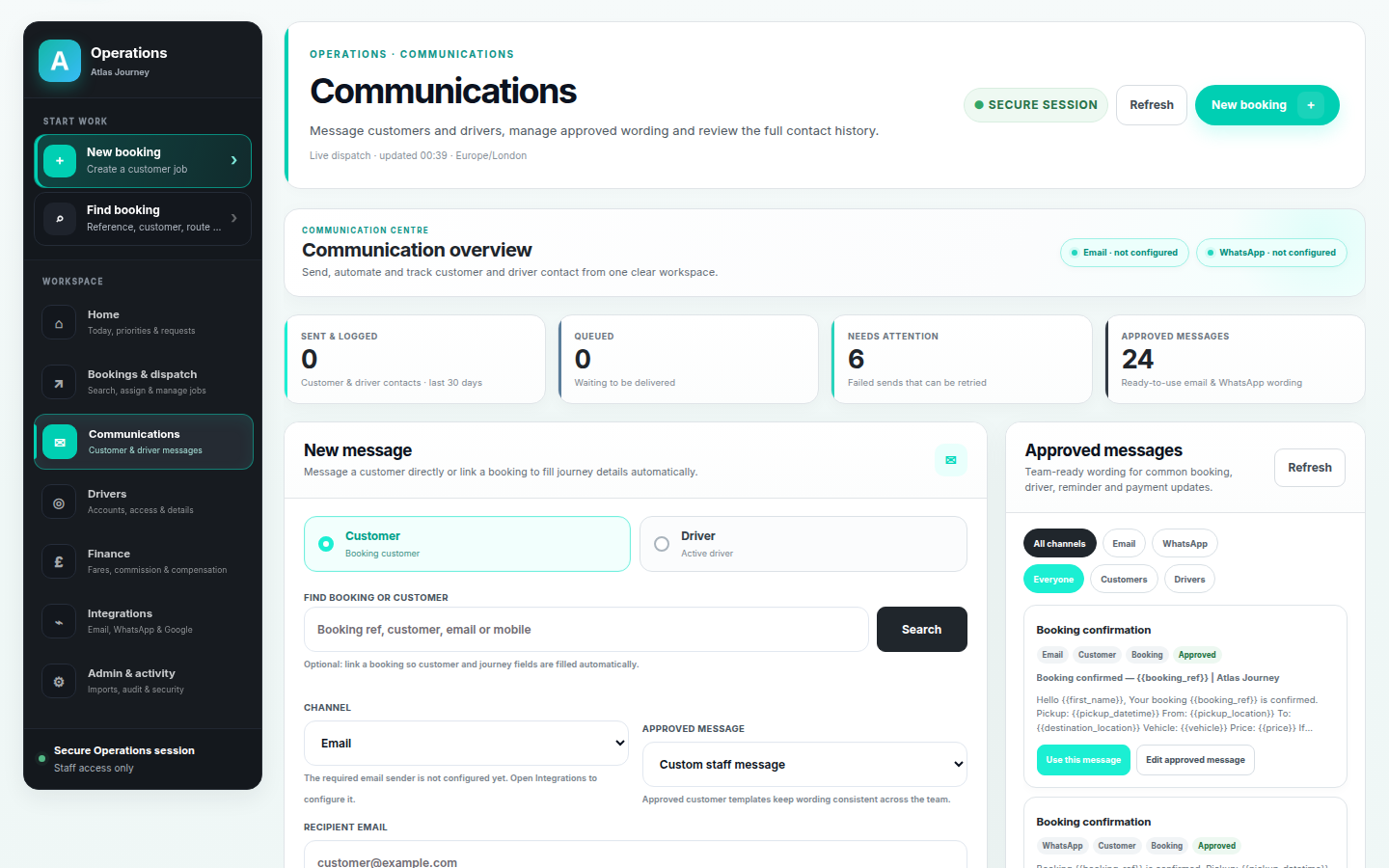
Communications centre for the demo transport platform with pre-approved email and WhatsApp templates, channel filters and delivery counts.
Communications centre. Send, automate and track customer and driver contact from one workspace using pre-approved email and WhatsApp templates, with full contact history. Sample templates shown; integrations are env-gated.
Automation

Consistent customer contact, from approved wording.

Pre-approved templates keep booking, reminder and payment messages consistent, and every message can be linked to a booking so journey details fill in automatically.
  • Pre-approved email and WhatsApp templates
  • Messages linked to bookings and customers
  • Full contact history for customers and drivers
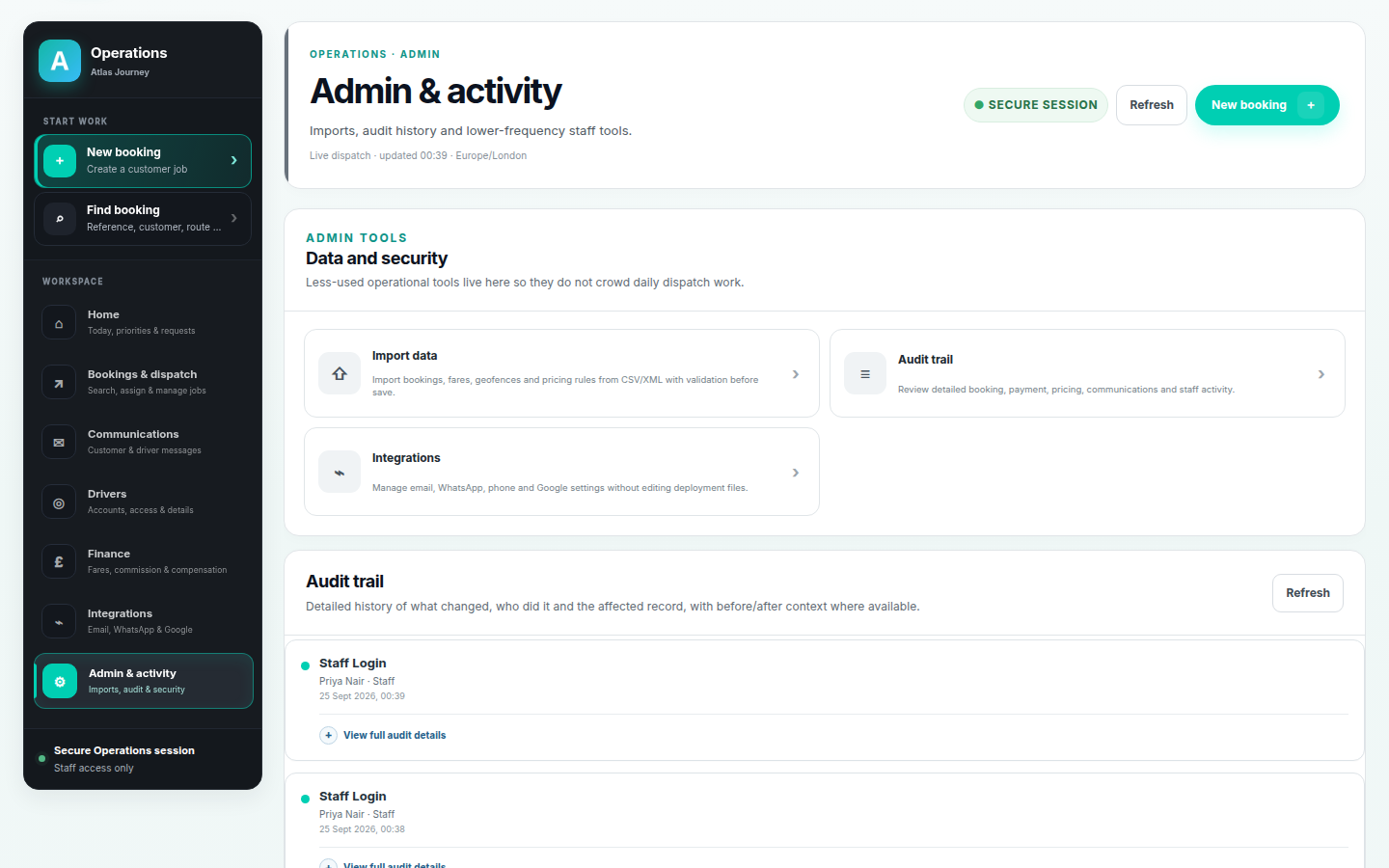
Admin and activity screen for the demo transport platform with a detailed audit trail of who changed what and CSV/XML import tools.
Admin & activity. A detailed audit trail records who changed what and which record it affected, with CSV/XML import kept alongside lower-frequency data and security tools. Sample activity shown.
Traceability

A history the team can trust, and a clean way to import data.

Important actions leave a useful trail, and bookings, fares, geofences and pricing rules can be imported from CSV/XML with validation before save—so onboarding data does not mean starting from scratch.

  • Audit trail with before/after context where available
  • CSV/XML import with validation before save
  • Lower-frequency admin tools kept out of daily dispatch
How the work flows

From customer booking to completed, reconciled job.

Each stage feeds the next from the same records, so the operation moves forward without re-keying.

  1. 01

    Quote

    Live fixed-fare quote.

  2. 02

    Journey details

    Pick-up, drop-off, date and time.

  3. 03

    Vehicle selection

    Matched to passengers and luggage.

  4. 04

    Extras

    Return legs, stops and options.

  5. 05

    Confirmation

    Booking confirmed and recorded.

  6. 06

    Dispatch

    Driver assigned per leg.

  7. 07

    Driver workflow

    Status updated from the portal.

  8. 08

    Customer updates

    Automated messages at each step.

Value

What the platform demonstrates.

Not a set of metrics—evidence of one connected operation and the capabilities a build like this brings together.

One connected workflow

Quote, booking, dispatch, driving and reconciliation all run from the same records.

Reduced reliance on disconnected tools

One platform in place of inboxes, spreadsheets and separate trackers.

Customer self-service

Customers book and manage journeys without phoning or emailing the office.

Centralised booking management

Every booking is searchable, filterable and owned in one place.

Structured staff operations

Dispatch, drivers and fares are run from a single operations workspace.

Automated communications

Consistent customer and driver contact from pre-approved templates.

Reusable transport business logic

Pricing, vehicles and journey rules are configured, not hard-coded.

Technology & capabilities

Practical, secure foundations.

A maintainable stack with security handled as part of the product, and third-party services kept optional behind environment configuration.

Backend

FastAPI with a PostgreSQL database, structured around the operation's records and rules.

Frontend

A static single-page application for the public booking site and the operations workspace.

Security

argon2 credential hashing, encrypted integration secrets and session controls.

Deployment

Docker-based deployment designed to be understandable and supportable after launch.

Payments & messaging

Optional Stripe, SMTP and WhatsApp integrations, enabled per environment.

Calendars & identity

Optional Microsoft and Google integrations, kept behind environment configuration.

Start a project

Have a workflow that has outgrown spreadsheets?

Tell us what happens today—from the first enquiry to the final reconciliation—and we'll help turn it into one dependable system.