Custom Business Software / Property Operations

Property Management Operations Platform

An illustrative demonstration, with sample data, of a property operations platform: properties, clients, contracts, maintenance, compliance and day-to-day actions in one structured system. This is not a completed client project.
PropertiesClientsContractsMaintenanceComplianceAutomation
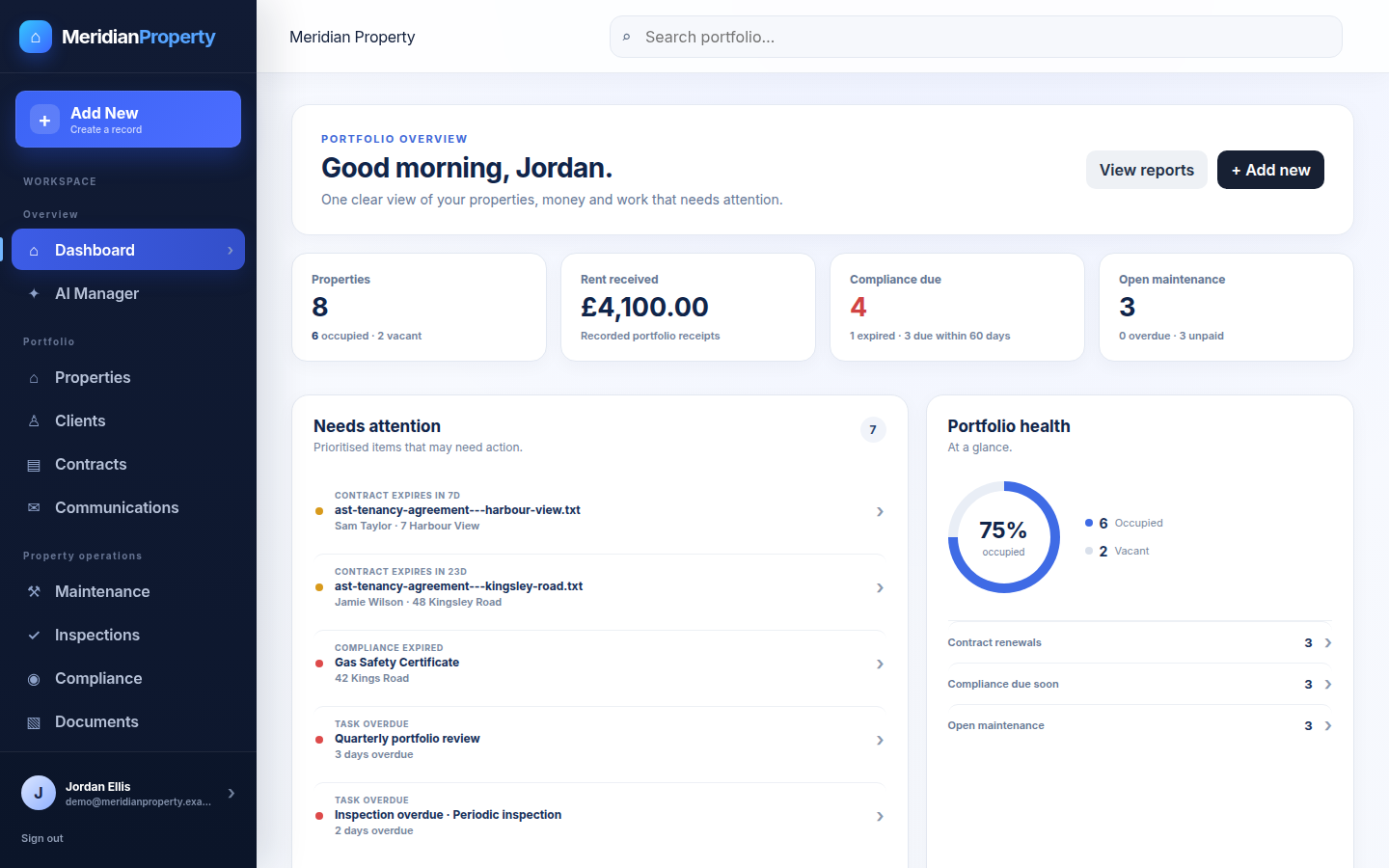
Portfolio dashboard for the demo property platform showing KPIs for properties, rent received, compliance due and open maintenance, a prioritised needs-attention feed and an occupancy donut.
Portfolio dashboard. One view of the portfolio—headline KPIs, a prioritised needs-attention feed and an occupancy donut—so the next action is obvious instead of buried across tools. Sample data shown.
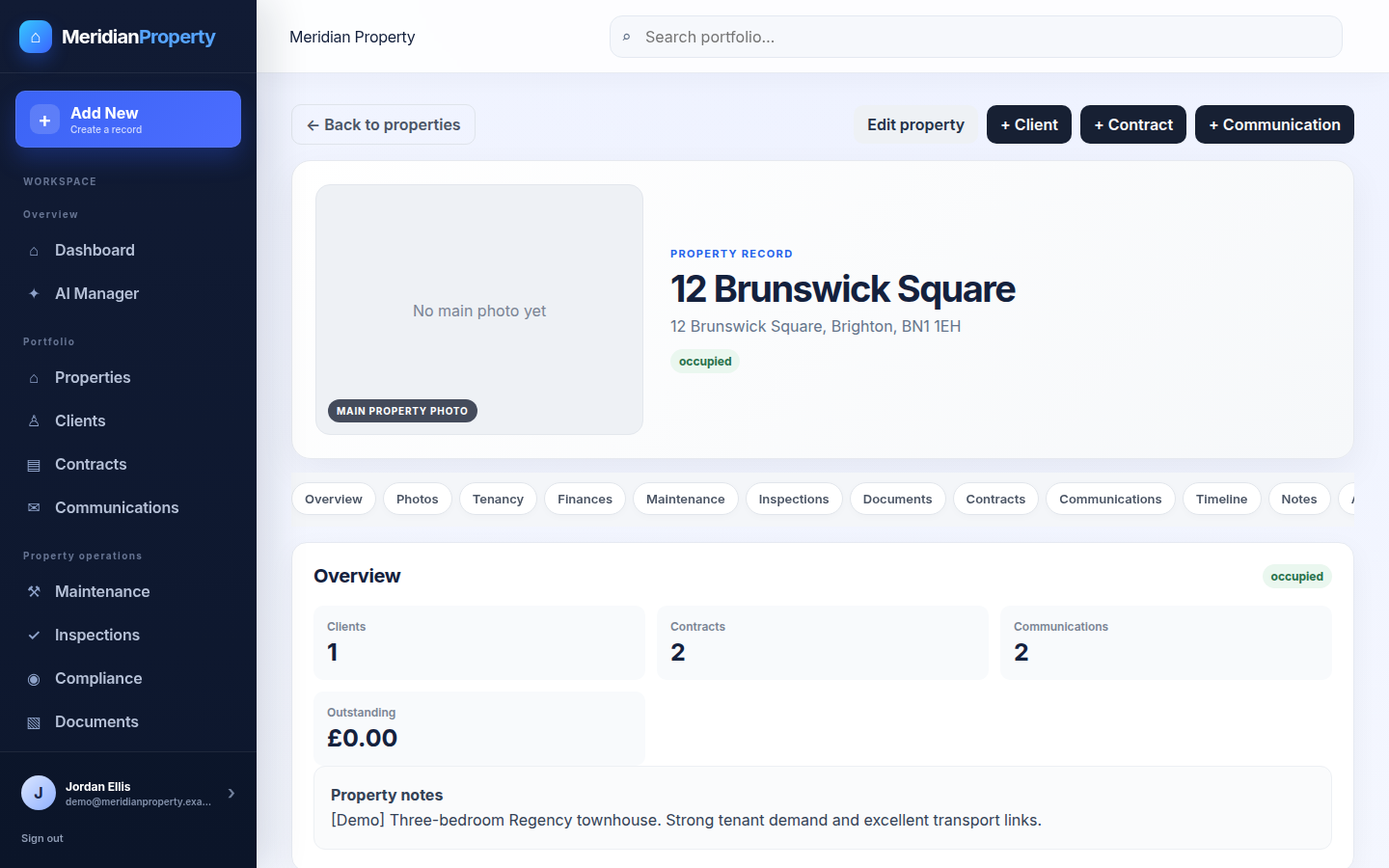
Central property record for a demo property showing a tabbed layout covering overview, photos, tenancy, finances, maintenance, inspections, documents, contracts, communications, timeline and notes.
Property record. One tabbed record per property, with everything attached.
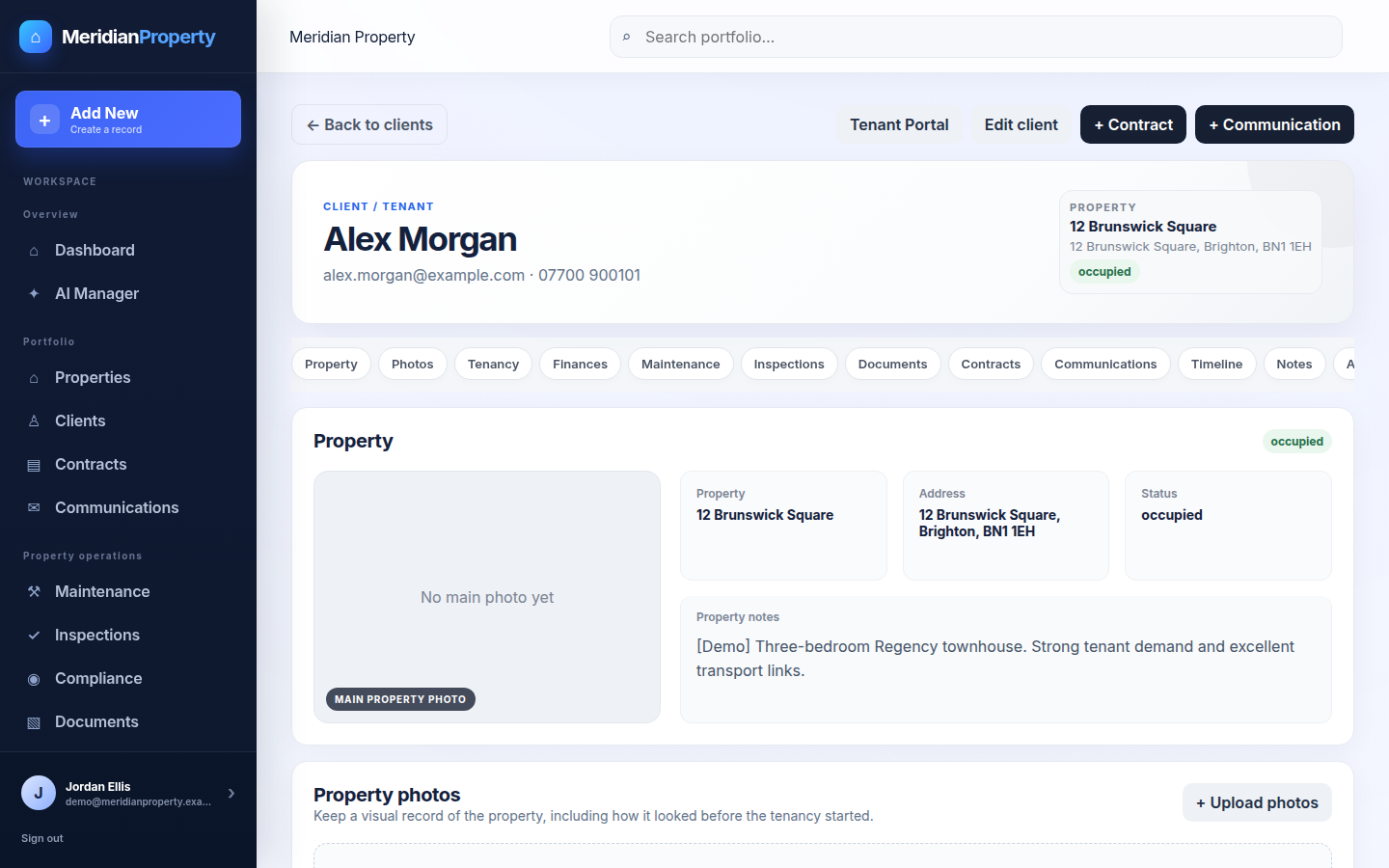
Client record for a demo tenant showing the linked property, contact details, documents, communications and tasks in one place.
Client record. People linked to their property and history.
Demo overview

One operational system for the property lifecycle.

Properties, clients, contracts, maintenance and compliance stop living in separate files and inboxes and become one structured, searchable operations platform with clear ownership and history.

The operational challenge

Portfolio detail scattered across files, inboxes and memory.

Property information sat across spreadsheets, inboxes, folders, document systems and reminder calendars.
Maintenance messages, compliance trackers and key dates lived apart from the records they related to.
As the portfolio grows, information gets harder to find and actions easier to miss.
The platform brings these threads into one structured system with a single record set.
The solution

Everything the operation needs, in one workspace.

Property and client records feed a working operations platform where staff track contracts, key dates, maintenance, compliance, tasks and documents—all against the same connected records.

  • Property records
  • Client & tenant records
  • Contracts & documents
  • Key dates & renewal alerts
  • Maintenance tracking
  • Compliance management
  • Tasks & actions
  • Property photos
  • Global search
  • Dashboards
  • Communication linking
  • Automation
Key features

Built around how the portfolio actually runs.

Each area is a verified part of the platform, connected to the same records so nothing has to be re-keyed.

Property records

A tabbed central record per property covering overview, tenancy, documents, maintenance and more.

Client management

Central client and tenant records linked to their property, contacts, documents and history.

Contracts

Agreements stored with version history and renewal-date tracking so nothing lapses unnoticed.

Maintenance

Repairs and inspections logged against the property with contractor, priority, status and cost.

Compliance

A register that helps teams track compliance requirements and expiry dates against each property.

Tasks & actions

Day-to-day actions kept against the records they relate to, so follow-ups don't get missed.

Documents

Certificates, agreements and photos stored on the property and client they belong to.

Dashboard & alerts

KPIs, a needs-attention feed, upcoming renewals and outstanding actions in one clear view.

Inside the platform

A closer look at each workflow.

Screenshots from the debranded demo. All names, addresses and figures are sample data.
Portfolio dashboard for the demo property platform with KPI cards, a needs-attention feed and an occupancy donut.
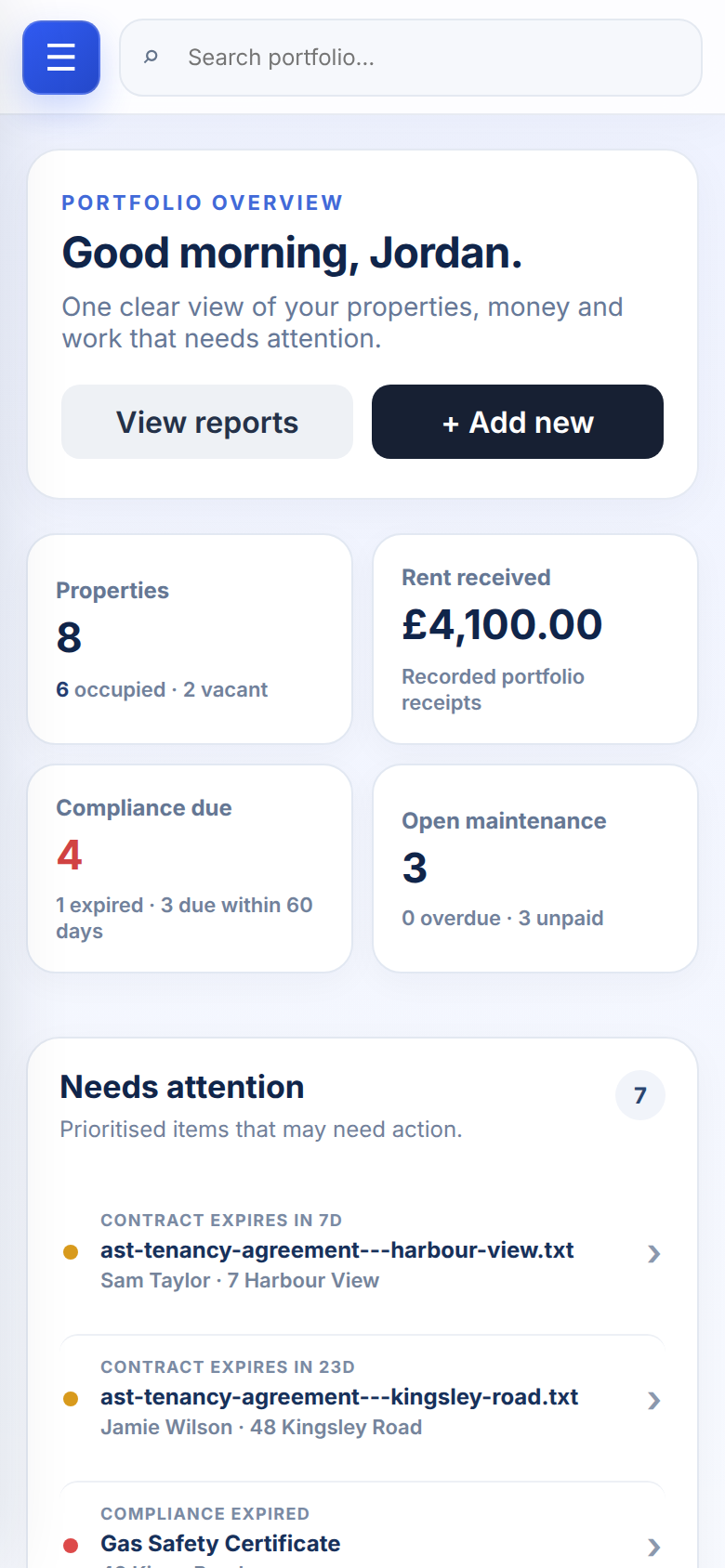
Mobile view of the demo property dashboard showing KPI cards and the needs-attention feed.
Dashboard, desktop and mobile. The same prioritised view of KPIs, needs-attention items and occupancy, laid out responsively so it stays usable on a phone. Sample data shown.
Overview

Open the platform and see what matters first.

Rather than a landing page, the platform opens on a working dashboard: the numbers that matter, the items that need action, and where occupancy stands—so nothing important waits to be noticed.

  • KPIs for properties, rent, compliance and maintenance
  • Prioritised needs-attention feed
  • Occupancy donut and portfolio health at a glance
Central property record for a demo property showing a tabbed layout covering overview, photos, tenancy, finances, maintenance, inspections, documents, contracts, communications, timeline and notes.
Central property record. Property details, client relationships, contracts, documents, maintenance, compliance, tasks, photos and communication history brought into one tabbed record. Sample property shown.
Property record

One property. One operational record.

Every property opens into a single tabbed record, so the people, dates, documents, open work and history that relate to it all sit in one place rather than scattered across tools.
  • Overview, photos, tenancy, finance and documents in tabs
  • Linked clients, contracts, maintenance and compliance
  • Tasks, communication history and a full timeline
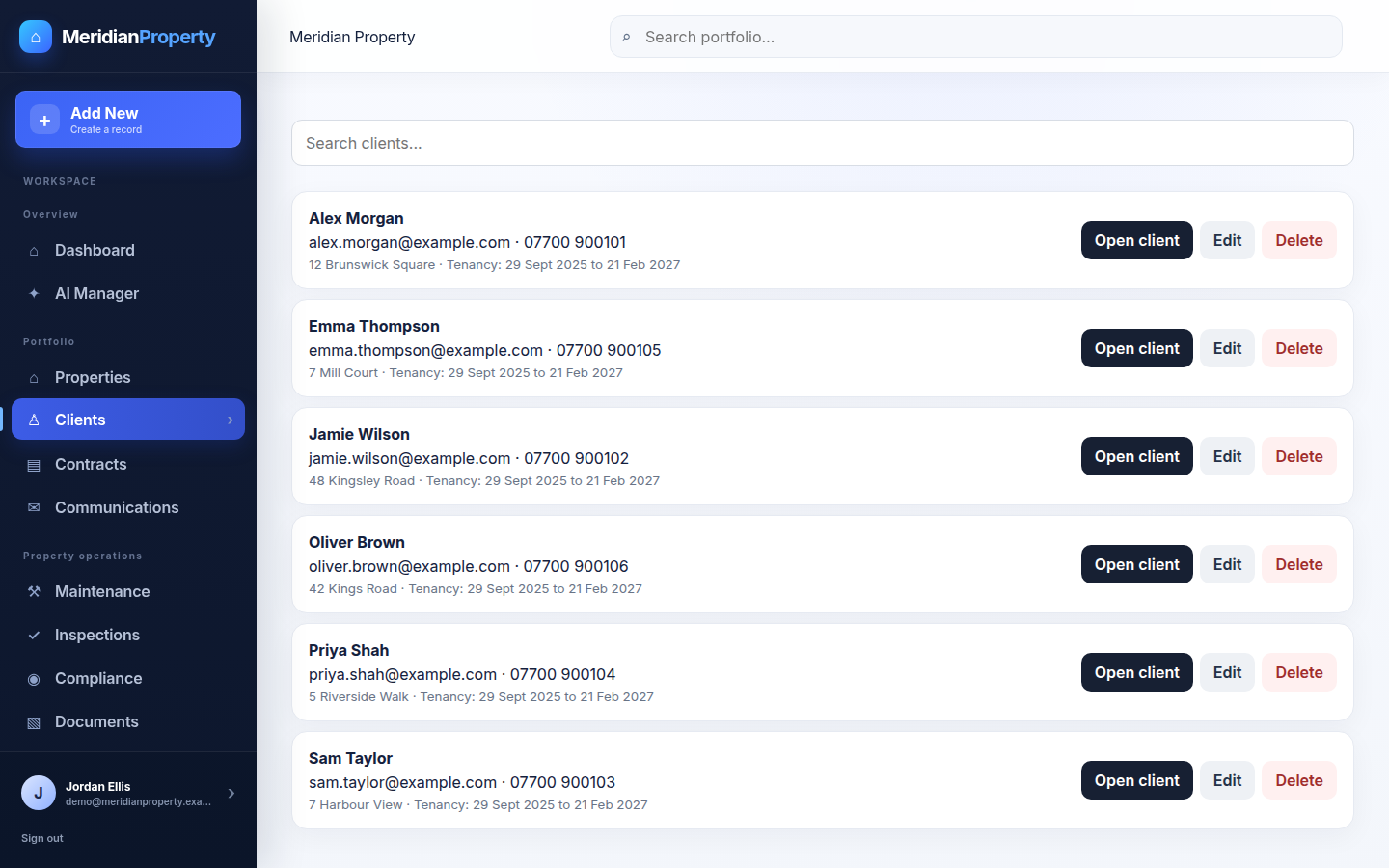
Clients list for the demo property platform with names, contact details, linked property and tenancy dates.
Client record for a demo tenant showing the linked property, tenancy details, documents, communications and tasks on one record.
Clients and client record. A clients list plus a central client record with the linked property, documents, communications and tasks, so people and properties stay joined up. Sample clients shown.
Clients

Clients linked to their property and their history.

Related information—linked property, tenancy details, documents, communications, tasks and relevant contract information—lives on one client record, so context travels with the person, not a spreadsheet row.
  • Clients list with linked property and tenancy dates
  • Central client record with documents and tasks
  • Direct links between people, contracts and properties
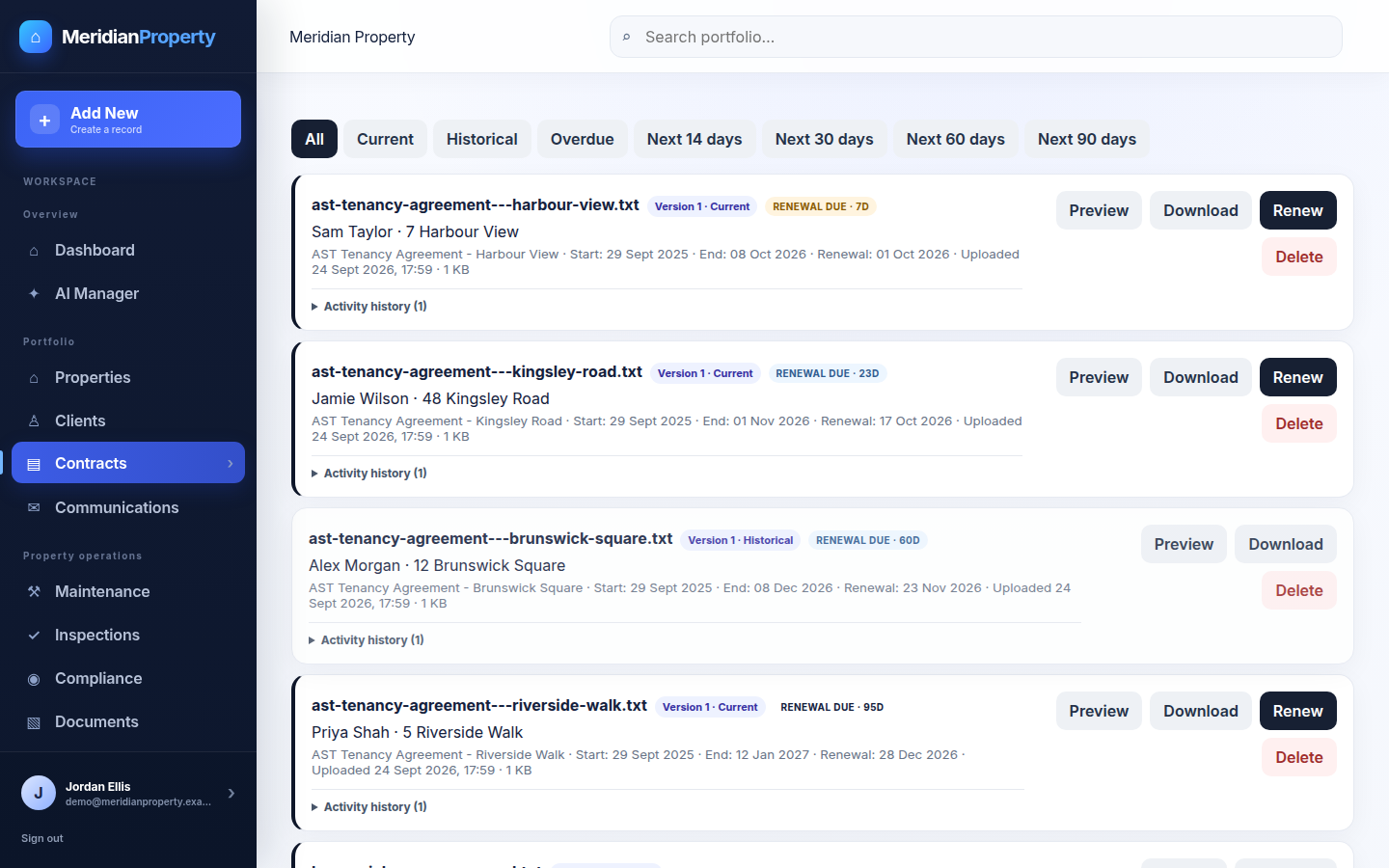
Contracts screen for the demo property platform showing agreements with version history, renewal-date windows of 14, 30, 60 and 90 days and preview, download and renew actions.
Contracts & key dates. Agreements stored with version history and renewal-date tracking across 14/30/60/90-day windows, so upcoming and overdue dates are visible early. Sample contracts shown.
Contracts

Renewals that surface before they become urgent.

Contracts are stored with version history and renewal dates tracked in clear windows, and important dates stay visible with alerts and reminders—so agreements are handled ahead of time rather than discovered late.
  • Contract storage with version history
  • Renewal-date tracking across 14/30/60/90-day windows
  • Important-date visibility with alerts and reminders
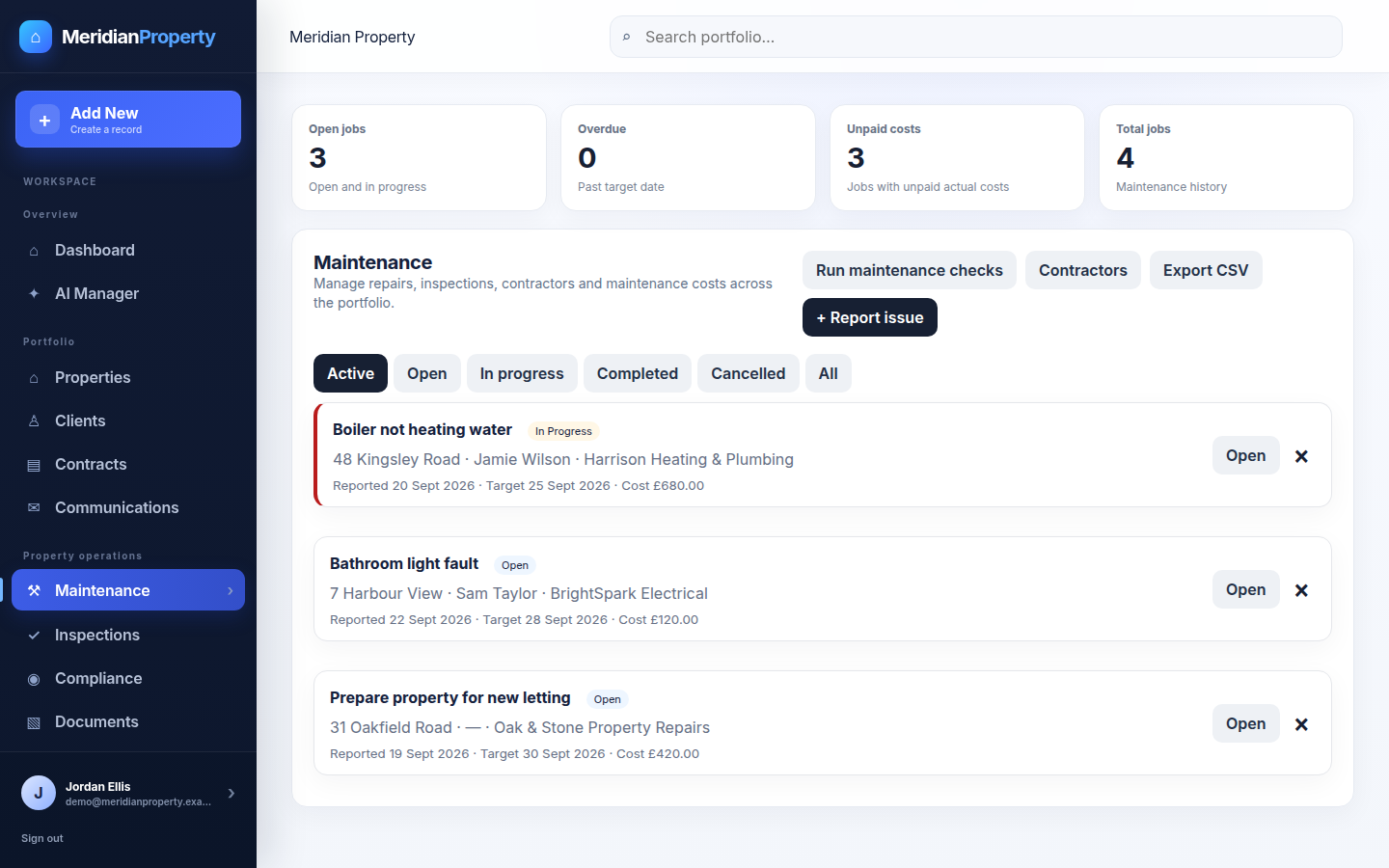
Maintenance screen for the demo property platform listing jobs with contractors, priority, status, target dates and costs, with open, overdue and unpaid-cost summaries.
Maintenance jobs. Repairs and inspections with contractors, priority, status, target dates and costs, summarised by open, overdue and unpaid work. Sample jobs shown.
Maintenance

Issues become structured, trackable work.

Operational issues are logged against the property as trackable jobs with contractor, priority, status and cost—so open and overdue work is visible and reportable rather than lost in email threads.
  • Jobs with contractors, priority and status
  • Target dates and recorded costs
  • Open, overdue and unpaid-cost summaries
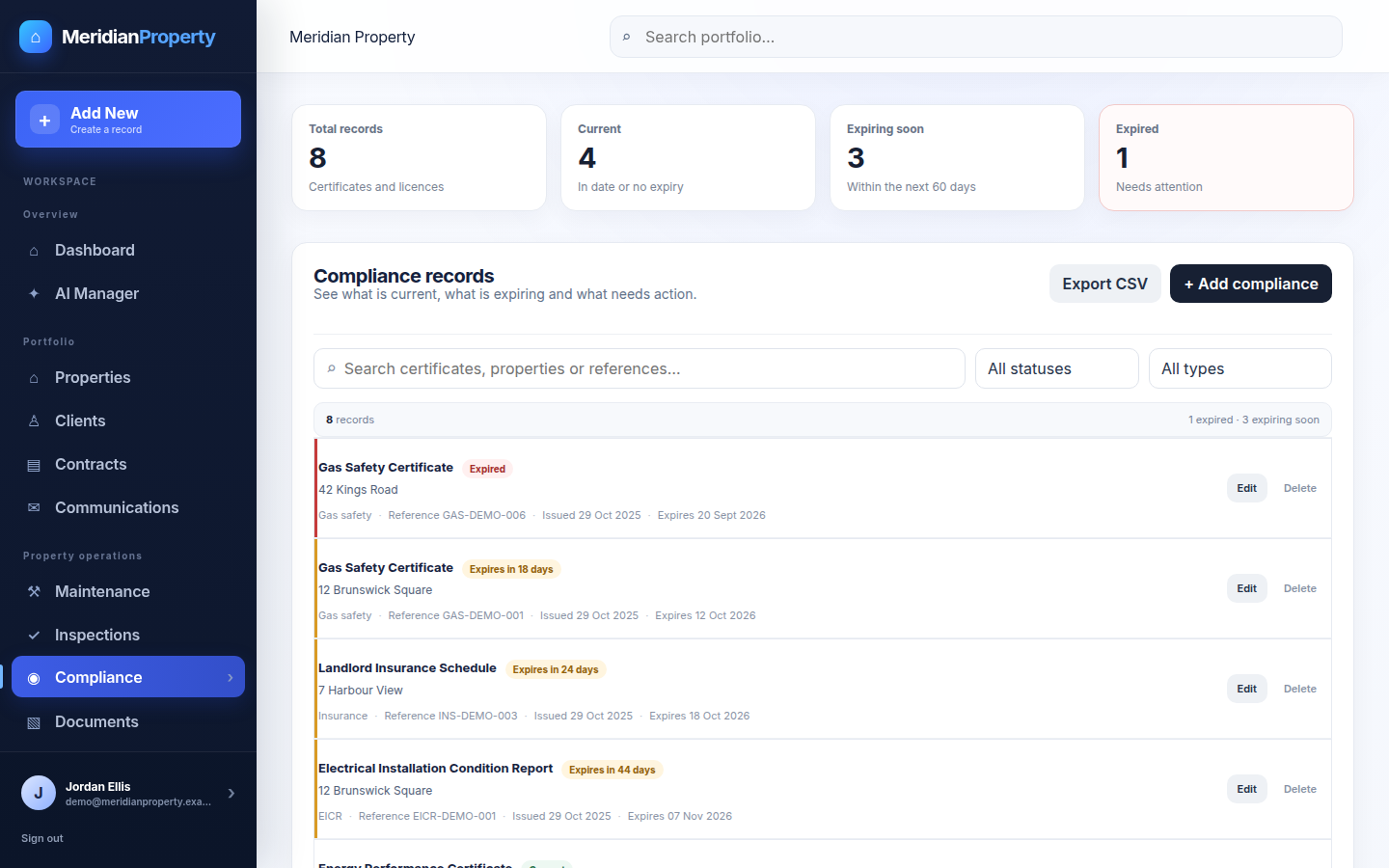
Compliance register for the demo property platform flagging expired and expiring certificates such as Gas Safety, EICR, EPC and insurance with issue and expiry dates.
Compliance register. Certificates and licences with status, flagging what is current, what is expiring soon and what has already lapsed—Gas, EICR, EPC and insurance. Sample records shown.
Compliance

Requirements tracked beside the properties they relate to.

The compliance register helps teams track compliance requirements and deadlines alongside the properties they relate to, and flags what needs attention—so approaching and lapsed dates are surfaced rather than depending on memory.
  • Gas, EICR, EPC and insurance in one register
  • Clear expired and expiring-soon flags
  • Requirements linked to the relevant property
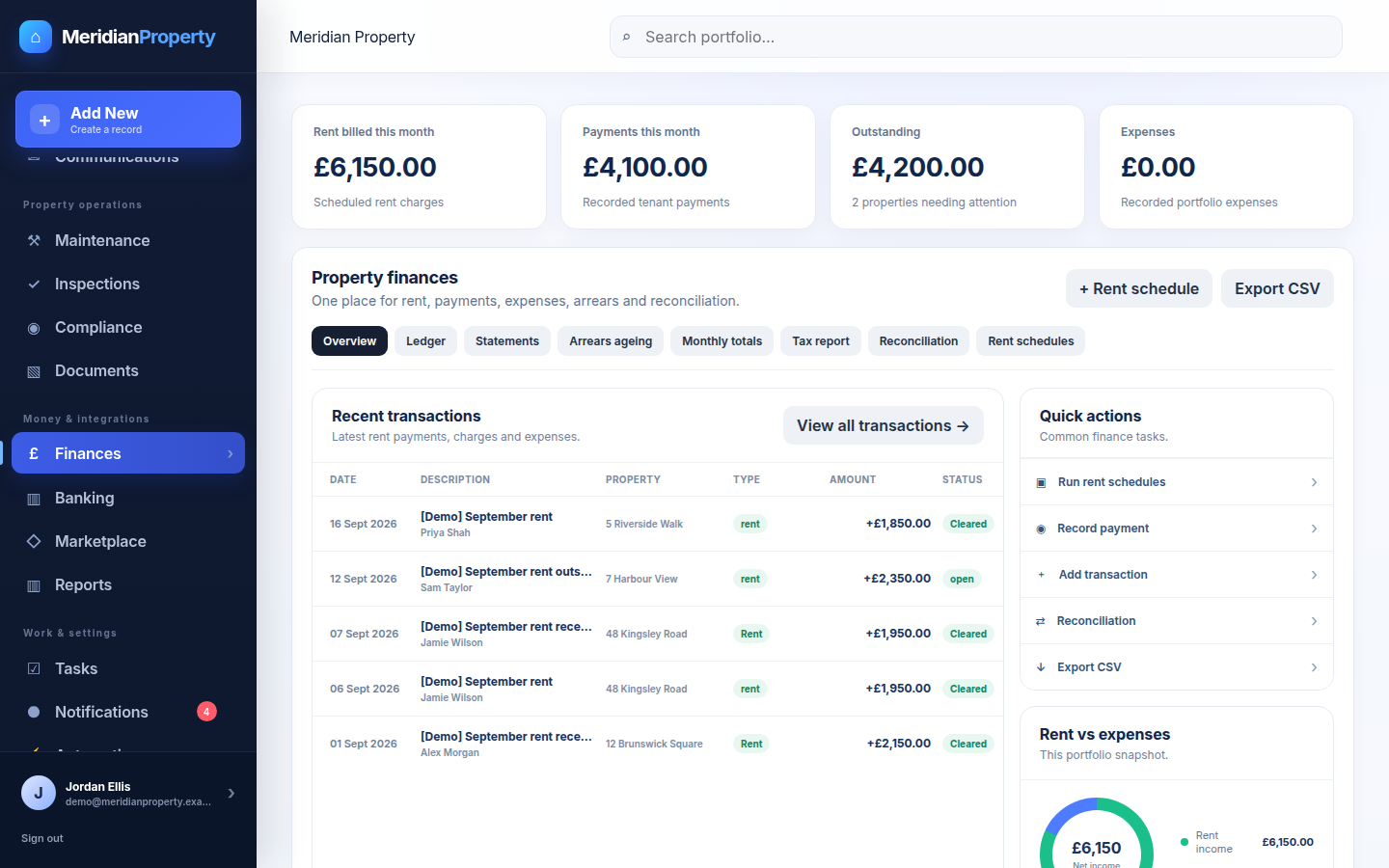
Finance screen for the demo property platform showing KPI cards for rent billed, payments, outstanding and expenses, a recent-transactions ledger, and tabs for statements, arrears ageing, tax report, reconciliation and rent schedules.
Finance & reconciliation. Rent billed, payments and outstanding tracked per property, with a ledger, statements, arrears ageing, tax reporting and reconciliation. Sample figures shown.
Finance

Rent, arrears and reconciliation in one place.

Rent schedules, payments, expenses and arrears stay attached to each property—with a ledger, statements, tax-year reporting and reconciliation—so the financial picture sits alongside the operational record instead of in a separate spreadsheet.
  • Rent schedules and recorded payments
  • Arrears ageing and outstanding balances
  • Statements, tax report and reconciliation
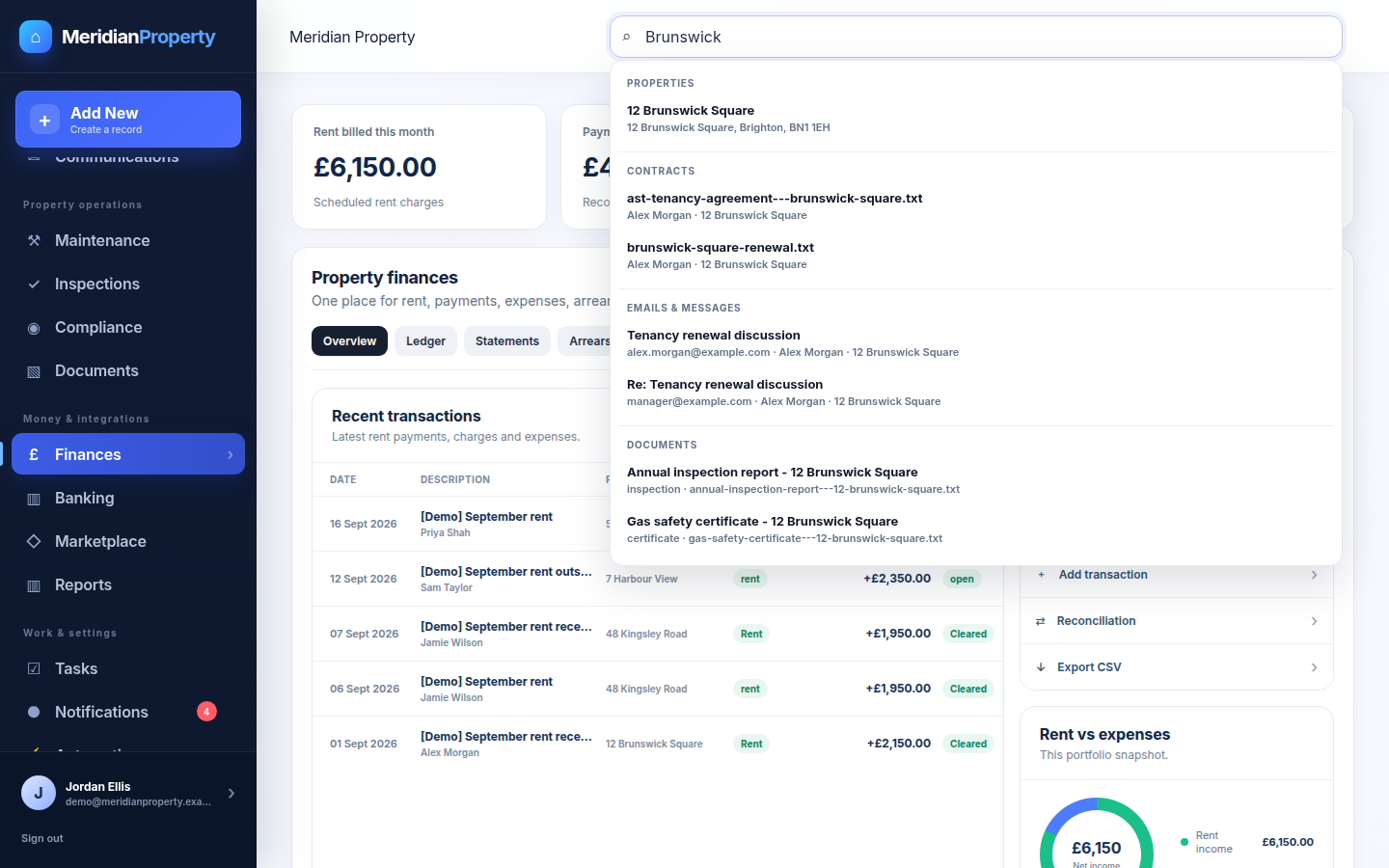
Global search for the demo property platform returning grouped results across properties, contracts, communications and documents for a single query.
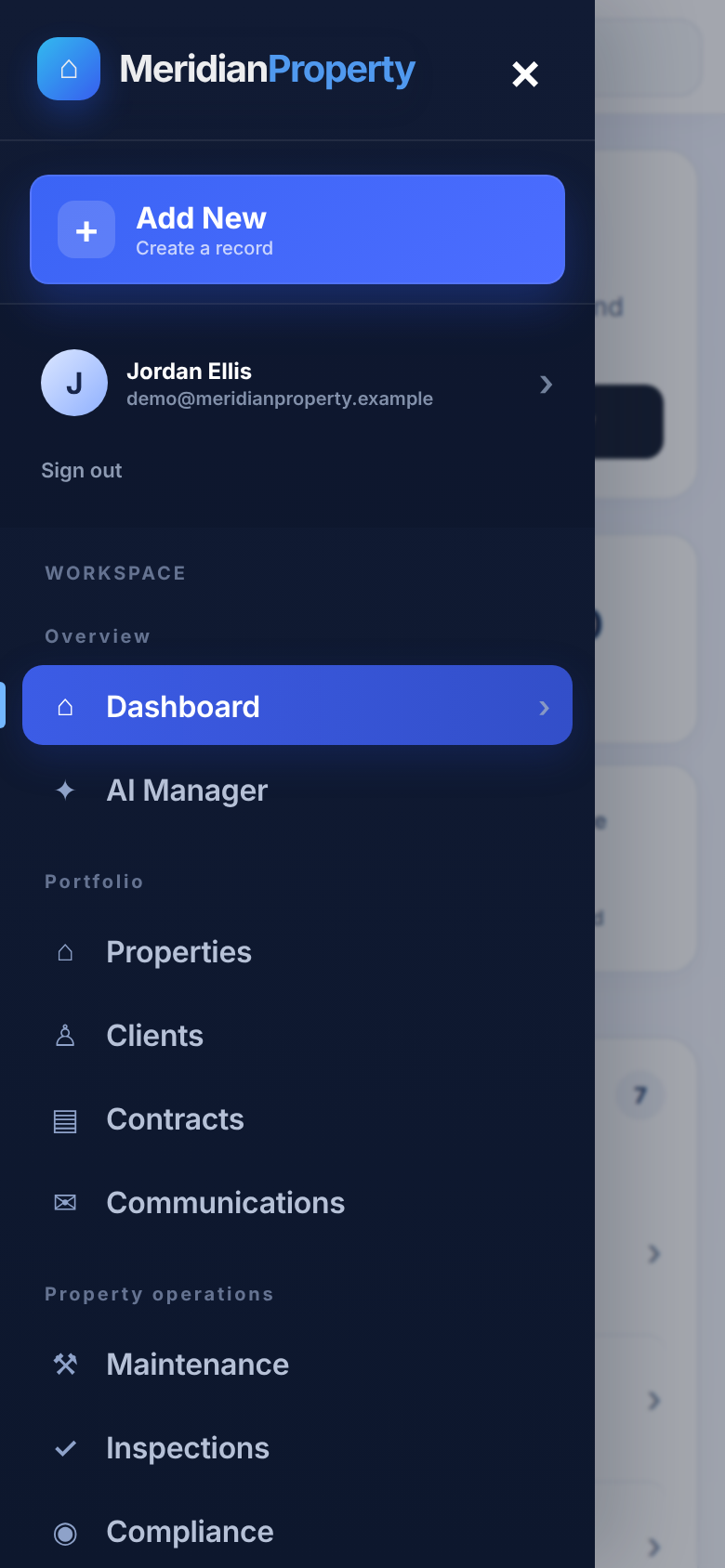
Mobile navigation menu for the demo property platform listing dashboard, properties, clients, contracts and operations sections.
Search and visibility. Portfolio-wide search returns grouped results across properties, contracts, communications and documents, and the platform stays usable on mobile. Sample results shown.
Search & visibility

Find anything, and see what needs attention.

A single search spans the whole portfolio, and filtering, dashboard KPIs, alerts, upcoming renewals and outstanding actions keep the operation visible—so information is quick to find and nothing slips through.

  • Global search with grouped results and filtering
  • Dashboard KPIs, alerts and upcoming renewals
  • Responsive layout usable in the field
How the work flows

From new record to tracked action.

Each stage builds on the same connected records, so nothing is tracked twice.

  1. 01

    Property

    Add the property into one structured record.

  2. 02

    Client / tenancy

    Link clients and tenancy details.

  3. 03

    Contract

    Attach agreements and key dates.

  4. 04

    Maintenance / compliance

    Track jobs and requirements.

  5. 05

    Tasks / alerts

    Actions and reminders surface on the dashboard.

Value

What the platform demonstrates.

Not a set of metrics—evidence of one connected operation and the capabilities a build like this brings together.

One source of truth

Property information lives in one structured system instead of scattered files.

Structured relationships

Properties and clients are connected, so context travels with the record.

Visible contract dates

Renewal dates and important deadlines are surfaced with alerts.

Organised maintenance

Issues become trackable jobs rather than informal email threads.

Clearer compliance tracking

Requirements and expiry dates sit beside the properties they relate to.

Centralised documentation

Certificates, agreements and photos are stored on the right record.

Less reliance on spreadsheets

One platform in place of disconnected spreadsheets and inboxes.

Operational visibility

Dashboards and search give a clear view across the whole portfolio.

Technology & capabilities

Practical, secure foundations.

A maintainable stack with security handled as part of the product, and integrations kept optional behind environment configuration.

Backend

FastAPI with PostgreSQL and SQLAlchemy, modelling relational property, client and contract records.

Frontend

A React single-page application built with Vite for a responsive operations UI.

Security

JWT authentication with argon2 hashing and field encryption for sensitive data.

Documents & workflows

Document management, role-aware workflows and PDF statement generation.

Search & alerts

Search and filtering across records, with configurable alerts and automated reminders.

Integrations

An API-driven architecture with optional integrations enabled per environment.

Start a project

Managing operations across spreadsheets?

Tell us how a property, tenancy or renewal is tracked today, and we'll help turn it into one structured system.